clinfer JS : automatically generate CLIs from classes, ES Modules (CLI infer-ence)


clinfer brings CLI infer-ence to Node, Deno, and Bun. Pass it a class, an ES module, an object, or a function, and watch it build your interface automatically:
- Each field/property generates a CLI option (flag).
- Each method/function generates a CLI command (with positional arguments).
Simply write your tool as a standard class or ES module, and hand it over to clinfer. It will automatically parse the command-line arguments, map them to your code, execute the right methods, and handle the help menu. You can then easily customize the generated help, add aliases, and fine-tune your CLI.
Example with an ES module :
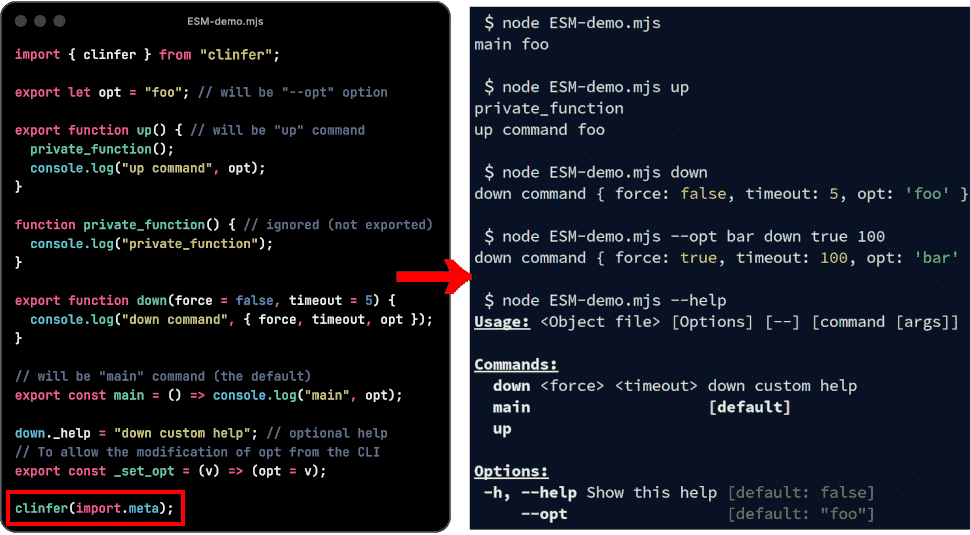
In this example, the clinfer specific code is simply clinfer(import.meta) to
process the CLI, and export const _set_opt = (v) => (opt = v); to allow
modification of the opt option (clinfer suggests adding it automatically at
first run if missing).
Example with a class :
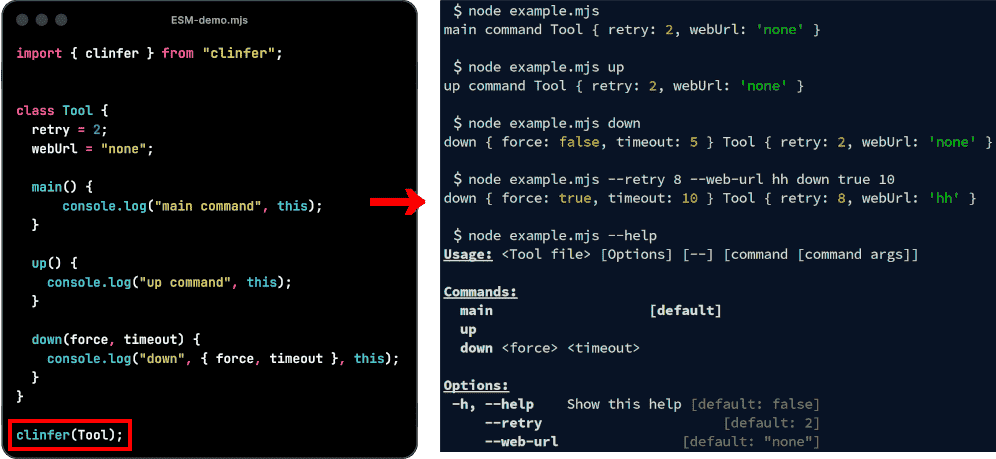
In this example, the clinfer specific code is simply clinfer(Tool) to process
the CLI.
#!/usr/bin/env -S deno run
import { clinfer } from "clinfer"; // after "npm install clinfer" for Node usage
// or import { clinfer } from "jsr:@jersou/clinfer@0.9.4"; for Deno

class Tool {
  retry = 2; // 2 is the default value, overwrite by "--retry 8" by example
  dryRun = false; // fields are converted to kebab case as global options
  webUrl = "none"; // → --web-url

  main() { // call if : $ ./example-lite-lite.ts main // or if $ ./example-lite-lite.ts
    console.log("main command", this);
  }

  up() { // call if : $ ./example-lite-lite.ts up
    console.log("up command", this);
  }

  down(force: boolean, timeout: number) { // call if : $ ./example-lite-lite.ts down true 14
    console.log("down command", { force, timeout }, this);
  }
}

clinfer(Tool); // or clinfer(new Tool());
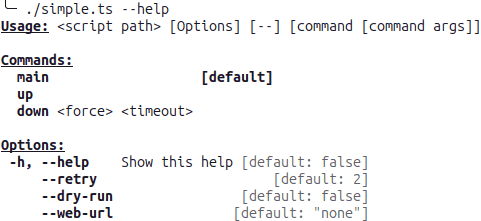
The help is generated automatically:
Run the commands with options and arguments
#             ↓↓↓↓↓↓↓↓↓↓↓↓↓ options ↓↓↓↓↓↓↓↓↓↓↓↓  ↓ command ↓  ↓ cmd args ↓
$ ./simple.ts --dry-run --web-url=tttt --retry 4     down        true  14
down command { force: true, timeout: 14 } Tool { retry: 4, dryRun: true, webUrl: "tttt" }

$ ./simple.ts down true 14                     #  ↓↓↓  default options from class init  ↓↓↓
down command { force: true, timeout: 14 } Tool { retry: 2, webUrl: "none", no_color: undefined }

$ ./simple.ts --dry-run --webUrl=tttt # ← same case of the field name works too : --webUrl or --web-url
main command Tool { retry: 2, dryRun: true, webUrl: "tttt" } # ← main is the default command

$ deno https://raw.githubusercontent.com/jersou/clinfer/refs/heads/main/examples/simple.ts --dry-run --web-url tttt --retry 4 down true  14
down command { force: true, timeout: 14 } Tool { retry: 4, dryRun: true, webUrl: "tttt" }
Generate a CLI with ES modules
Example from examples/example-module.ts or examples/node-npm/simple/example-module.mjs (NodeJs).
Generate a CLI with clinfer(import.meta) : exported functions are available as
commands.
import { clinfer } from "clinfer";

export function up() {
  private_function();
  console.log("up command");
}

function private_function() {
  console.log("private_function");
}

export function down(force = false, timeout = 5) {
  console.log("down command", { force, timeout });
}

export const main = () => console.log("main");

clinfer(import.meta);

// $ ./examples/example-module-lite.ts down true 100
// down command { force: true, timeout: 100 }
//
// ./examples/example-module-lite.ts --help
// Usage: <Object file> [Options] [--] [command [command args]]
//
// Commands:
//   down <force> <timeout>
//   main                   [default]
//   up
//
// Option:
//   -h, --help Show this help [default: false]
Due to ESM security limitations (exported variables are read only), the var/let variables are exposed as CLI options only if they are exported and if there is a “set” function that allows their modification.
clinfer suggests adding it automatically at first run :
This module contains exported variables without 'clinfer' setters : opt.
It's necessary for clinfer to process options (= exported var/let) due to ESM security limitations.
You must append these lines to "example-module.ts" :
    export const _set_opt = (v: typeof opt) => (opt = v);
Do you want me to append this lines at the end of "example-module.ts" now ? [Y/n]
Example with an option setter :
import { clinfer } from "clinfer";

export let opt = "foo";
// To allow the modification of opt from the CLI
export const _set_opt = (v: typeof opt) => (opt = v);

export function up() {
  private_function();
  console.log("up command", opt);
}

function private_function() {
  console.log("private_function");
}

down._help = "down custom help";
export function down(force = false, timeout = 5) {
  console.log("down command", { force, timeout, opt });
}

export const main = () => console.log("main", opt);

clinfer(import.meta);

// $ ./examples/example-module.ts --opt bar down true 100
// down command { force: true, timeout: 100, opt: "bar" }
//
// ./examples/example-module.ts --help
// Usage: <Object file> [Options] [--] [command [command args]]
//
// Commands:
//   down <force> <timeout> down custom help
//   main                   [default]
//   up
//
// Options:
//  -h, --help Show this help [default: false]
//      --opt                 [default: "foo"]
⚠️ warning : do not use await on clinfer(import.meta), doing so will cause a
deadlock, as clinfer awaits the module, which cannot be resolved if you use
await clinfer(import.meta).
Note: clinfer can generate CLI from imported module with import * as ... :
import { clinfer } from "clinfer";
import * as tool from "./example-module.ts";

clinfer(tool);
Examples
Several examples can be found in the examples/ folder.
Full example with decorators (Typescript)
Works with vanilla typescript or with experimentalDecorators = true
import { alias, clinfer, help } from "clinfer";

@help("This tool is a little example of clinfer") // optional description
class Tool {
  @alias("r") // optional alias -r for --retry
  retry = 2;
  @help("no changes mode") // optional description for "--dry-run" field
  dryRun = false; // fields are converted to kebab case as global options
  webUrl = "none"; // → --web-url

  main() {
    console.log("main command", this);
  }

  @help("create and start") // optional description for "up" command
  up() {
    console.log("up command", this);
  }

  down(force: boolean, timeout: number) {
    console.log("down command", { force, timeout }, this);
  }
}

clinfer(Tool); // or clinfer(new Tool());
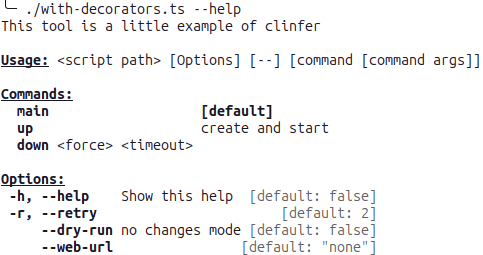
The help is generated automatically:
Full example without decorator (Javascript)
import { clinfer } from "clinfer";

class Tool {
  _help = "This tool is a little example of clinfer"; // optional description

  _retry_alias = "r"; // optional alias -r for --retry
  retry = 2;
  _dryRun_help = "no changes mode"; // optional description for "--dry-run" field
  dryRun = false; // fields are converted to kebab case as global options
  webUrl = "none"; // → --web-url

  main() {
    console.log("main command", this);
  }

  _up_help = "create and start"; // optional description for "up" command
  up() {
    console.log("up command", this);
  }

  down(force, timeout) {
    console.log("down command", { force, timeout }, this);
  }
}

clinfer(Tool); // or clinfer(new Tool());
The help is generated automatically (same as the previous):
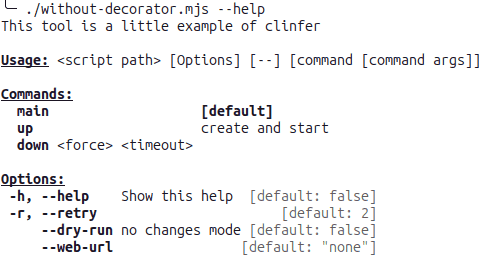
clinfer() usage
clinfer() function takes an object or a class as input, and an optional
config, see ClinferRunConfig chapter bellow.
Exemple : clinfer(Tool) or clinfer(new Tool()) or
clinfer(Tool, { noCommand: true })
clinferParse() usage
Same as clinfer(), but it doesn’t run the command, it returns the parsing
ClinferResult that contains:
- obj: The input object overwritten with the data from the parsing result
- command: The command to run from the parsing result
- commandArgs: The command arguments from the parsing result
- config: The input ClinferRunConfig
- help: The generated help
- subcommand: The subcommand ClinferResult if the command is a subcommand
Ignore _* and #* methods and fields (in the help)
Fields and methods that start with “_” are ignored.
_privateData = 12;
_privateMethod() {
  console.log("this method is not visible in the help (starts with '_')");
}
Note: this “private” method can be run by the CLI, it’s useful during the development.
Note2: js private fields #* are also ignored :
#privateData = 12;
#privateMethod() {
  console.log("this method is not visible in the help (starts with '#')");
}
Decorator @* or field _<field name>_*
Fields and methods can be extended with description, type or aliases using
decorators or _<field name>_* field. Decorator don’t work with Javascript (not
in the language) !
In summary :
@help(description: string)|_<field>_help: add description on class/methods/fields to display in the help@alias(alias: string)|_<field>_alias: add alias on method (-nfor example)@type(typeHelp: string)|_<field>_type: type to display in the help@negatable(help: string | boolean = true)|_<field>_negatable: enable--no-<option>(--no-dry-runfor example)@defaultHelp(defaultHelp: string)|_<field>_default: default to display in the help@usage(usage: string)|_<field>_usage: tool usage to display in the help@hidden()|_<field>_hidden: to hide in the help@subcommand()|_<field>_subcommand: use this field as a subcommand@noCommand()|_<field>_no_command: the tool have no command (only the main), process all positional arguments as main() args
Help description with the @help decorator or inline help
import { clinfer, help } from "clinfer";

@help("This tool is a little example of clinfer")
class Tool {
  retry = 2;
  webUrl = "none"; // fields are converted to kebab case as global options

  @help("skip colorize") // optional description for "no_color" field
  no_color?: string | boolean; // → --no-color

  main() {
    console.log("main command", this);
  }

  @help("create and start") // optional description for "up" command
  up() {
    console.log("up command", this);
  }

  down(force: boolean, timeout: number) {
    console.log("down command", { force, timeout }, this);
  }
}

clinfer(Tool);
Without decorator : optional fields _<filed or method name>_help are displayed
as description in the help :
#!/usr/bin/env -S deno run -A
import { clinfer } from "clinfer";

class Tool {
  _help = "This tool is a little example of clinfer"; // optional description
  retry = 2;
  webUrl = "none"; // fields are converted to kebab case as global options
  no_color?: string | boolean; // → --no-color
  _no_color_help = "skip colorize"; // optional description for "no_color" field
  _up_help = "create and start"; // optional description for "up" command

  main() {
    console.log("main command", this);
  }

  up() {
    console.log("up command", this);
  }

  down(force: boolean, timeout: number) {
    console.log("down command", { force, timeout }, this);
  }
}

if (import.meta.main) { // if the file is imported, do not execute this block
  clinfer(Tool);
}
Note : on method/function, the help can be defined by the prototype :
// if up is a method :
(Tool.prototype.up as any)._help = "create and start"
// if up is a function :
up._help = "up custom help";
Alias
Alias of option can be created, with the @alias decorator or with
_<field name>_alias :
#!/usr/bin/env -S deno run -A
import { clinfer } from "../clinfer_parser.ts";
import { alias, help, type } from "../src/decorators.ts";

class Tool {
  @alias("a")
  all?: boolean;
  @alias("r")
  retry = 2;
  @alias("w")
  webUrl = "none";

  @alias("nb")
  @alias("n")
  @help("n & b")
  @type("boolean")
  no_color?: string | boolean;

  main() {
    console.log("main command", this);
  }
}
Produce the help :
...
Options:
       -h, --help     Show this help [default: false]
       -a, --all
       -r, --retry                       [default: 2]
       -w, --web-url                [default: "none"]
 -n, --nb, --no-color n & b                 [boolean]
Short parameters can be aggregated, -an here :
$ ./alias-with-decorator.ts -an -r 8
main command Tool { all: true, retry: 8, webUrl: "none", no_color: true }
-an = -a -n
Example without the @alias decorator :
class Tool {
  _all_alias = "a";
  all?: boolean;
  _retry_alias = "r";
  retry = 2;
  _webUrl_alias = "w";
  webUrl = "none";

  _no_color_alias = ["nb", "n"];
  _no_color_help = "n & b";
  _no_color_type = "boolean";
  no_color?: string | boolean;

  main() {
    console.log("main command", this);
  }
}
@subcommand decorator and _*_subcommand and $fieldName
Use the field (class or object) as a subcommand, if the field name starts with
$, the field is treated as a subcommand.
Example that supports up to three levels of subcommands, with options available
at each level, like :
./tool.ts -v=77 --token=123 get --watch=true pod --pod-opt 546 pod1
git-subcomand-one-object-short.ts :
import { clinfer } from "clinfer";

const kubectl = {
  v: 1,
  token: "",
  $get: {
    watch: false,
    $pod: {
      podOpt: 2,
      main(podName: string) {
        console.log({ kubectl, podName });
      },
    },
    $deployments: {
      deploymentsOpt: 3,
      main() {
        console.log("→ → deployments", { kubectl });
      },
    },
  },
  $explain: {
    main(val: string) {
      console.log({ kubectl, val });
    },
  },
};

clinfer(kubectl);

// ./git-subcomand-one-object-short.ts -v=77 --token=123  get --watch=true  pod  --pod-opt 546 pod1
// {
//   kubectl: <ref *2> {
//     v: 77,
//     token: "123",
//     "$get": <ref *1> {
//       watch: true,
//       "$pod": {
//         podOpt: 546,
//         main: [Function: main],
//       },
//       "$deployments": { deploymentsOpt: 3, main: [Function: main] },
//     },
//     "$explain": { main: [Function: main] }
//   },
//   podName: "pod1"
// }
“Class” exemple in examples/git-subcommand.ts
// → <Tool> [--dry-run] [ [up [--watch] <count>] | [down [--volumes] <force> <timeout>] ]
class Up {
  _clinfer_parent?: Tool;
  watch = false;
  main(_count: number) {
    console.log("Up", this);
  }
}

class Tool {
  dryRun = false;

  @subcommand()
  up = Up;

  @subcommand()
  down = {
    volumes: false,
    main(force: boolean, timeout: number) {
      console.log("Down", this);
    },
  };
}

clinfer(new Tool());
./subcommand.ts --help
Usage: <Tool file> [Options] [--] [command [command args]]
Commands:
up --help | [sub Options / cmd / args]
down --help | [sub Options / cmd / args]
Options:
-h, --help Show this help [default: false]
--dry-run [default: false]
--down [default: [object Object]]
$ ./subcommand.ts down --help
Usage: <Object file> [Options] [--] [command [command args]]
Command:
main <force> <timeout> [default]
Options:
-h, --help Show this help [default: false]
--volumes [default: false]@jsonConfig decorator and _json_config
Enable configCli: see “configCli” chapter below :
enable "--config <path|json string>" to load json config, Show in the help if it's a string
If the value is a string, it will be used in the help for “–config” description.
Argument parsing
clinfer use @std/cli, based on minimist.
Kebab case or the same name
Example : webUrl field can be set by --webUrl or --web-url:
$ ./simple.ts --web-url test
main command Tool { retry: 2, dryRun: false, webUrl: "test" }

$ ./simple.ts --webUrl test
main command Tool { retry: 2, dryRun: false, webUrl: "test" }
several ways to pass parameters
For example, for an option -l, --out-limit from a field outLimit with an
alias l :
-l=8-l 8-l8--out-limit 8--out-limit=8--outLimit 8--outLimit=8
Are equivalent.
Passing boolean
$ ./example-lite.ts
main command Tool { retry: 2, webUrl: "none", no_color: undefined }
$ ./example-lite.ts --no-color
main command Tool { retry: 2, webUrl: "none", no_color: true }
$ ./example-lite.ts --no-color=false
main command Tool { retry: 2, webUrl: "none", no_color: "false" }
$ ./example-lite.ts --no-color=true
main command Tool { retry: 2, webUrl: "none", no_color: "true" }
Passing arrays :
Use several times an option will fill the field if it’s an array :
class Tool {
  @alias("a")
  arr: string[] = [];
  ...
}
$ ./Tool.ts --arr=aa --arr bb -a=cc -a dd --a ee
→ arr === ["aa", "bb", "cc", "dd", "ee"]
Passing objects :
Object can be deserialized :
--ac.bb aaa --ac.dd.ee v --ac.dd.ff wwill fill ac field with
{ bb: "aaa", dd: { ee: "v", ff: "w" }Example :
class Tool {
  ac = {};
  ...
}
$ ./Tool.ts --ac.bb aaa --ac.dd.ee v --ac.dd.ff w
→ ac === { bb: "aaa", dd: { ee: "v", ff: "w" } })
The default command
- If there is only one method/subcommand => this method is the default
- If the main method exist => main is the default
- else => no default method
$ ./example-lite.ts
main command Tool { retry: 2, webUrl: "none", no_color: undefined }
ClinferRunConfig
clinfer(Tool, < optional ClinferRunConfig > )
type ClinferRunConfig = {
  args?: string[]; // default : Deno.args or process.argv.slice(2)
  dontPrintResult?: boolean; // default false : false, print the command return
  noCommand?: boolean; // the tool have no command (only the main), process all positional arguments to the default command
  printHelpOnError?: boolean; // print the help if an error is thrown and then re-throw the error
  mainFile?: string; // allows to change the name of the file in the help, instead of the default <{Class name} file>
  meta?: ImportMeta; // import.meta to use : don't run if the file is imported, and use import.meta.url in the help
  configCli?: boolean; // enable "--config <path|json string>" to load json config, Show in the help if it's a string
  dontConvertCmdArgs?: boolean; // don't convert "true"/"false" to true/false in command arguments, and not to number after --
};
Return value
If the method run by clinfer return a value != undefined, it will be print in
stdout. If it’s a promise, the result of the promise will be awaited.
This behavior can be disabled with the config :
clinfer(Tool, { dontPrintResult: true })
noCommand
No command in the command line → all positional argument are used as arguments of the default command.
If the tool has only one command, noCommand is forced.
clinfer(Tool, { noCommand: true }); → ./example-no-command.ts --help give :
This tool is a "no-command" example of clinfer usage

Usage: <Tool file> [Options] [--] [args]

Options:
  --retry=<RETRY>        (default "2")
  --web-url=<WEB_URL>    web URL ... (default "none")
  --no-color=<NO_COLOR>  skip colorize
  --help                 Show this help
Print the help on error
If printHelpOnError is enabled, the help is print if any error is thrown while
the command execution. Else, the help is print only for errors that have
{ cause: { clinfer: true } }.
It’s useful if a required option is missing, for example.
import { clinfer } from "clinfer";
export class Tool {
  throw = "true";
  main() {
    if (this.throw === "true") {
      throw new Error("add --throw=false option !");
    }
    console.log("OK !");
  }
}
clinfer(Tool, { printHelpOnError: true });
To print help on specific error only, without printHelpOnError=true, use
{ cause: { clinfer: true } } :
import { clinfer } from "clinfer";
export class Tool {
  noThrow = false;

  main() {
    if (!this.noThrow) {
      throw new Error("add --no-throw option !", { cause: { clinfer: true } });
    }
    console.log("OK !");
  }
}
clinfer(Tool);
configCli : load a json config with --config <path | or json string>
If configCli === true in the ClinferRunConfig or @jsonConfig is used or
_json_config = true
$ cat ./load-config.ts
...
clinfer(Tool, { configCli: true });

$ ./load-config.ts --help
...
     --config  Use this json file or string to read the options [string]
...

$ ./load-config.ts  down
down command { force: undefined, timeout: undefined } Tool { retry: 2, dryRun: false, webUrl: "none", config: undefined }

$ cat load-config.json
{ "retry": 44, "dryRun": true, "webUrl": "yyy" }

$ ./load-config.ts --retry 88 --config ./load-config.json down
down command { force: undefined, timeout: undefined } Tool {
  retry: 88,
  dryRun: true,
  webUrl: "yyy",
  config: "./load-config.json"
}
mainFile
Allows to change the name of the file in the help, instead of the default for
example <Tool file>.
clinfer(Tool, { mainFile: "my-tool" });…will change the usage line in the help :
Usage: my-tool [Options] [--] [command [command args]]meta
Use meta to avoid the manual import.meta.main check :
if (import.meta.main) { // if the file is imported, do not execute this block
  clinfer(Tool);
}
is equivalent to :
clinfer(Tool, { meta: import.meta });The basename of import.meta.url will be used in the generated help, as
mainFile.
This feature doesn’t work with Node (no import.meta.main).
dontConvertCmdArgs
If -- is used and dontConvertCmdArgs=true, all command arguments will be
strings.
# with dontConvertCmdArgs: true
$ ./Tool.ts -- main 123 true foo
 → command = main
 → commandArgs = ["123", "true", "foo"]);

# with dontConvertCmdArgs: false (the default)
$ ./Tool.ts -- main 123 true foo
 → command = main
 → commandArgs = 123, true, "foo"]);
Plain Object
A plain JS Object can be used :
import { clinfer } from "clinfer";

clinfer({
  retry: 2,
  main() {
    console.log("main command", this);
  },
  _up_help: "create and start the services",
  up(svc: string, timeout = 10) {
    console.log("up command", { svc, timeout, retry: this.retry });
  },
  down(svc: string) {
    console.log("down command", { svc, retry: this.retry });
  },
});
$ ./plain_object_lite.ts --retry=77 up foo 123
up command { svc: "foo", timeout: 123, retry: 77 }
$ /plain_object_lite.ts --help
Usage: <Object file> [Options] [--] [command [command args]]
Commands:
main [default]
up <svc> <timeout> create and start the services
down <svc>
Options:
-h, --help Show this help [default: false]
--retry [default: 2]Function
A function can be used :
import { clinfer } from "clinfer";

function down(force = false, timeout = 5) {
  console.log("down command", { force, timeout });
}

clinfer(down);

// $ ./examples/example-function.ts true 100
// down command { force: true, timeout: 100 }
//
// ./examples/example-function.ts --help
// Usage: <script path> [Options] [--] <force> <timeout>
//
// Option:
//   -h, --help Show this help [default: false]
Node support : npm install clinfer or npx jsr add @jersou/clinfer
From NPM : npm install clinfer
Run npm install clinfer and then, import with
import { clinfer } from "clinfer"; :
import { clinfer } from "clinfer"; // after "npm install clinfer"
class Tool { ... }
clinfer(Tool);
See node usage examples :
From JSR : npx jsr add @jersou/clinfer
Run npx jsr add @jersou/clinfer and then, import with
import { clinfer } from "@jersou/clinfer"; :
import { clinfer } from "@jersou/clinfer"; // after "npx jsr add @jersou/clinfer"
class Tool { ... }
clinfer(Tool);
Node usage examples :
Links
- https://jsr.io/@jersou/clinfer
- https://github.com/jersou/clinfer
- https://www.npmjs.com/package/clinfer
Dependencies (all)
@std/cli: to parse args@std/fmt: to log with colors/bold@std/text: to change the option case@std/assert: for the tests
Try in a browser
With esm.sh, playcode.io, jsfiddle.net) :
import { clinferParse } from "https://esm.sh/jsr/@jersou/clinfer@0.9.4";

class Tool {
  opt = 123;
  main() {}
}

const res = clinferParse(Tool, { args: ["--opt", "78"] });
console.log(res);
Inspiration
Probably inspired by:
- Bash-utils : run bash
function from CLI with
utils:run "$@", I created 4 years before clinfer, - and by Clap (with the derive feature) after the development of mouse-actions (one year before clinfer) : deserialize options from CLI to struct.
Note: I have only recently discovered (May 2026) other projects sharing the same concept.
Comparison with other tools : Yargs, @std/cli (minimist)
The usual tools rather take a particular configuration of the tool and produce an output data without a defined model. You need to learn their API to define the interface you want.
clinfer follows a different approach: it takes the desired model and fills it according to the command line. If you want to type the parsing output, you don’t need to do anything else. No duplicate writing for the CLI config and the parsing output model/type.
And of course, like classic tools, it also generates the help automatically, detects the non-existent option/order errors, and launches the desired command with its parameters.
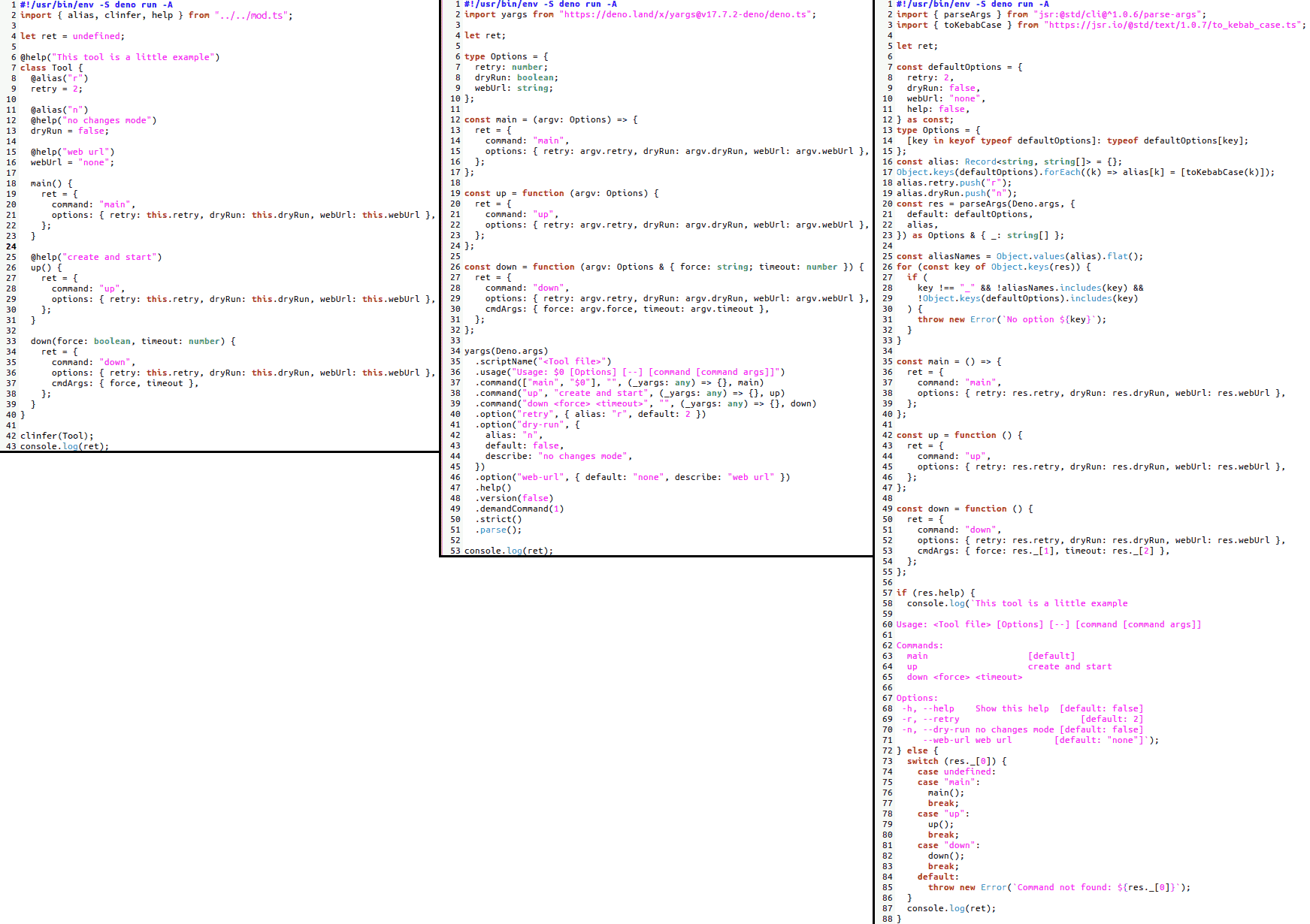
A comparison try is made in the examples/cli-tools-diff folder, it compares :
- clinfer : examples/cli-tools-diff/clinfer.ts
- vs Yargs : examples/cli-tools-diff/yargs.ts
- vs @std/cli based on minimist : examples/cli-tools-diff/std-cli.ts
These 3 files provide the same CLI :
Usage: <Tool file> [Options] [--] [command [command args]]

Commands:
  main                   [default]
  up                     create and start
  down <force> <timeout>

Options:
 -h, --help    Show this help  [default: false]
 -r, --retry                       [default: 2]
 -n, --dry-run no changes mode [default: false]
     --web-url web url        [default: "none"]
The 3 implementations side by side :
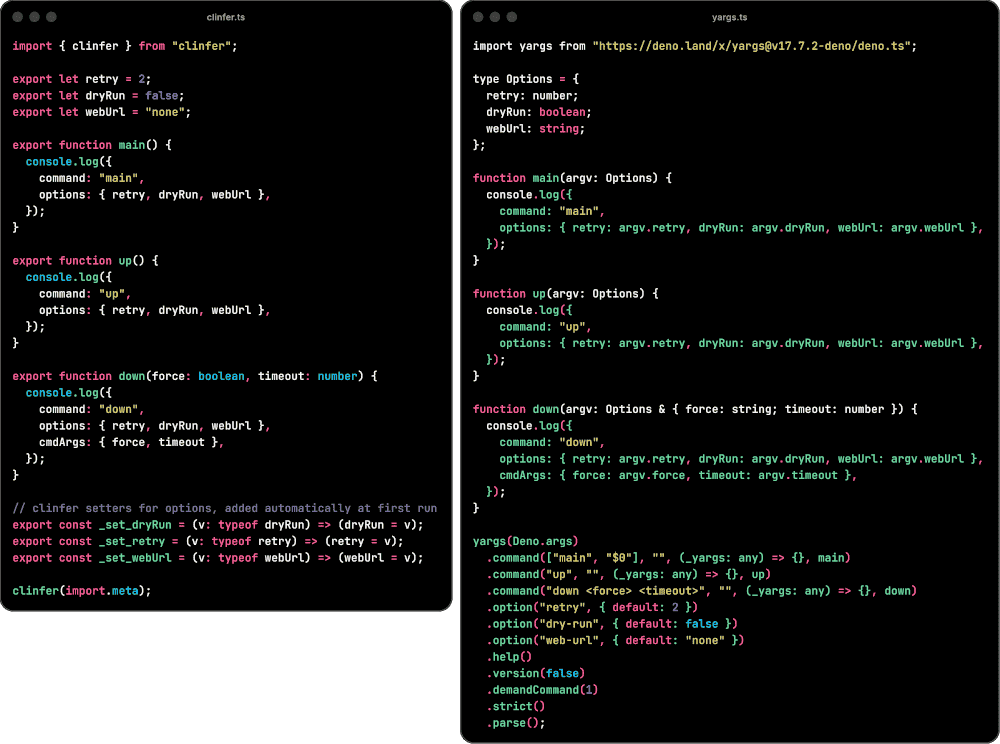
A simpler comparaison from examples/cli-tools-diff/esm-diff :
Real case
- The project Studio-Pack-Generator use clinfer and have lots of CLI options generated from a rather understandable file (in my opinion, of course).
- simpler example : examples/dcpps.ts
- even simpler : examples/dcpm.ts