CLI lite parser for Node and Deno

CliteParser generates CLI from classes (or objects) : each method generates a “command”, each field generates an “option”. example-lite.ts example :
#!/usr/bin/env -S deno run
import { cliteRun } from "jsr:@jersou/clite@0.6.1";
// or after "deno add @jersou/clite" : import { cliteRun } from "@jersou/clite";
// or for Node usage, after "npx jsr add @jersou/clite" (same import from "@jersou/clite")

class Tool {
  retry = 2; // 2 is the default value, overwrite by "--retry 8" by example
  dryRun = false; // fields are converted to kebab case as global options
  webUrl = "none"; // → --web-url

  main() { // call if : $ ./example-lite-lite.ts // or if $ ./example-lite-lite.ts main
    console.log("main command", this);
  }

  up() { // call if : $ ./example-lite-lite.ts up
    console.log("up command", this);
  }

  down(force: boolean, timeout: number) { // call if : $ ./example-lite-lite.ts down true 14
    console.log("down command", { force, timeout }, this);
  }
}

cliteRun(Tool); // or cliteRun(new Tool());
The help is generated automatically:
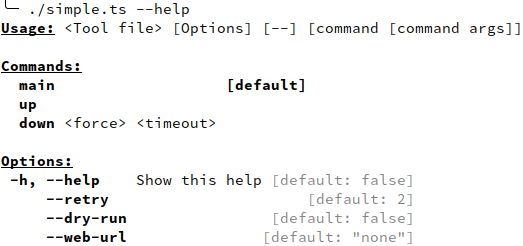
Run the commands with options and arguments
#             ↓↓↓↓↓↓↓↓↓↓↓↓↓ options ↓↓↓↓↓↓↓↓↓↓↓↓  ↓ command ↓  ↓ cmd args ↓
$ ./simple.ts --dry-run --web-url=tttt --retry 4     down        true  14
down command { force: true, timeout: 14 } Tool { retry: 4, dryRun: true, webUrl: "tttt" }

$ ./simple.ts down true 14                     #  ↓↓↓  default options from class init  ↓↓↓
down command { force: true, timeout: 14 } Tool { retry: 2, webUrl: "none", no_color: undefined }

$ ./simple.ts --dry-run --webUrl=tttt # ← same case of the field name works too : --webUrl or --web-url
main command Tool { retry: 2, dryRun: true, webUrl: "tttt" } # ← main is the default command

$ deno https://raw.githubusercontent.com/jersou/clite-parser/refs/heads/main/examples/simple.ts --dry-run --web-url tttt --retry 4 down true  14
down command { force: true, timeout: 14 } Tool { retry: 4, dryRun: true, webUrl: "tttt" }
Examples
Several examples can be found in the examples/ folder.
Full example with decorators (Typescript)
Works with vanilla typescript or with experimentalDecorators = true
import { alias, cliteRun, help } from "jsr:@jersou/clite@0.6.1";

@help("This tool is a little example of CliteParser") // optional description
class Tool {
  @alias("r") // optional alias -r for --retry
  retry = 2;
  @help("no changes mode") // optional description for "--dry-run" field
  dryRun = false; // fields are converted to kebab case as global options
  webUrl = "none"; // → --web-url

  main() {
    console.log("main command", this);
  }

  @help("create and start") // optional description for "up" command
  up() {
    console.log("up command", this);
  }

  down(force: boolean, timeout: number) {
    console.log("down command", { force, timeout }, this);
  }
}

cliteRun(Tool); // or cliteRun(new Tool());
The help is generated automatically:
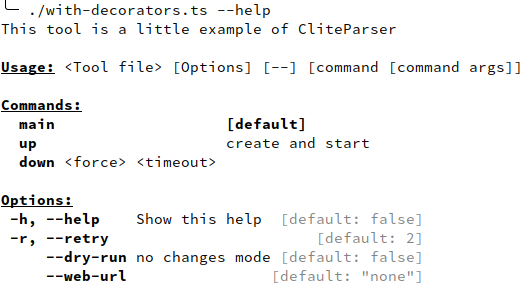
Full example without decorator (Javascript)
import { cliteRun } from "jsr:@jersou/clite@0.6.1";

class Tool {
  _help = "This tool is a little example of CliteParser"; // optional description

  _retry_alias = "r"; // optional alias -r for --retry
  retry = 2;
  _dryRun_help = "no changes mode"; // optional description for "--dry-run" field
  dryRun = false; // fields are converted to kebab case as global options
  webUrl = "none"; // → --web-url

  main() {
    console.log("main command", this);
  }

  _up_help = "create and start"; // optional description for "up" command
  up() {
    console.log("up command", this);
  }

  down(force, timeout) {
    console.log("down command", { force, timeout }, this);
  }
}

cliteRun(Tool); // or cliteRun(new Tool());
The help is generated automatically (same as the previous):
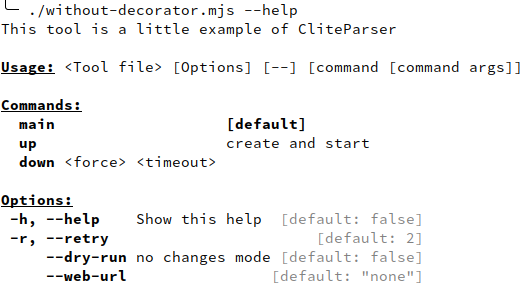
cliteRun() usage
cliteRun() function takes an object or a class as input, and an optional
config, see CliteRunConfig chapter bellow.
Exemple : cliteRun(Tool) or cliteRun(new Tool()) or
cliteRun(Tool, { noCommand: true })
Decorator @* or inline field _<field name>_*
Fields can be extended with description, type or aliases using decorators or
_<field name>_* field.
Help description with the @help decorator or inline help
import { cliteRun, help } from "jsr:@jersou/clite@0.6.1";

@help("This tool is a little example of CliteParser")
class Tool {
  retry = 2;
  webUrl = "none"; // fields are converted to kebab case as global options

  @help("skip colorize") // optional description for "no_color" field
  no_color?: string | boolean; // → --no-color

  main() {
    console.log("main command", this);
  }

  @help("create and start") // optional description for "up" command
  up() {
    console.log("up command", this);
  }

  down(force: boolean, timeout: number) {
    console.log("down command", { force, timeout }, this);
  }
}

cliteRun(Tool);
Without decorator : optional fields _<filed or method name>_help or
_<filed or method name>_desc are displayed as description in the help (_desc
is deprecated) :
#!/usr/bin/env -S deno run -A
import { cliteRun } from "jsr:@jersou/clite@0.6.1";

class Tool {
  _help = "This tool is a little example of CliteParser"; // optional description
  retry = 2;
  webUrl = "none"; // fields are converted to kebab case as global options
  no_color?: string | boolean; // → --no-color
  _no_color_help = "skip colorize"; // optional description for "no_color" field
  _up_help = "create and start"; // optional description for "up" command

  main() {
    console.log("main command", this);
  }

  up() {
    console.log("up command", this);
  }

  down(force: boolean, timeout: number) {
    console.log("down command", { force, timeout }, this);
  }
}

if (import.meta.main) { // if the file is imported, do not execute this block
  cliteRun(Tool);
}
Alias
Alias of option can be created, with the @alias decorator or with
_<field name>_alias :
#!/usr/bin/env -S deno run -A
import { cliteRun } from "../clite_parser.ts";
import { alias, help, type } from "../src/decorators.ts";

class Tool {
  @alias("a")
  all?: boolean;
  @alias("r")
  retry = 2;
  @alias("w")
  webUrl = "none";

  @alias("nb")
  @alias("n")
  @help("n & b")
  @type("boolean")
  no_color?: string | boolean;

  main() {
    console.log("main command", this);
  }
}
Produce the help :
...
Options:
       -h, --help     Show this help [default: false]
       -a, --all
       -r, --retry                       [default: 2]
       -w, --web-url                [default: "none"]
 -n, --nb, --no-color n & b                 [boolean]
Short parameters can be aggregated, -an here :
$ ./alias-with-decorator.ts -an -r 8
main command Tool { all: true, retry: 8, webUrl: "none", no_color: true }
-an = -a -n
Example without the @alias decorator :
class Tool {
  _all_alias = "a";
  all?: boolean;
  _retry_alias = "r";
  retry = 2;
  _webUrl_alias = "w";
  webUrl = "none";

  _no_color_alias = ["nb", "n"];
  _no_color_help = "n & b";
  _no_color_type = "boolean";
  no_color?: string | boolean;

  main() {
    console.log("main command", this);
  }
}
@types
@defaultHelp
@negatable
@usage
@hidden
Argument parsing
Clite use @std/cli, based on minimist.
Kebab case or the same name
Example : webUrl field can be set by --webUrl or --web-url:
$ ./simple.ts --web-url test
main command Tool { retry: 2, dryRun: false, webUrl: "test" }

$ ./simple.ts --webUrl test
main command Tool { retry: 2, dryRun: false, webUrl: "test" }
Passing objects :
--ac.bb aaa --ac.dd.ee v --ac.dd.ff w
→ { ac: { bb: "aaa", dd: { ee: "v", ff: "w" } } }
Warning: boolean parameter without value preceding the command
If a boolean param without value is used before the command, you must:
- separate the boolean and the command by a double hyphen
-- - or use a value :
--dry-run=trueor--dry-run true
Otherwise, the command will be interpreted as the value of boolean parameter.
Default command
- If there is only one method/command => this method is the default
- If the main method exist => main is the default
- else => no default method
$ ./example-lite.ts
main command Tool { retry: 2, webUrl: "none", no_color: undefined }
Boolean options
$ ./example-lite.ts
main command Tool { retry: 2, webUrl: "none", no_color: undefined }
$ ./example-lite.ts --no-color
main command Tool { retry: 2, webUrl: "none", no_color: true }
$ ./example-lite.ts --no-color=false
main command Tool { retry: 2, webUrl: "none", no_color: "false" }
$ ./example-lite.ts --no-color=true
main command Tool { retry: 2, webUrl: "none", no_color: "true" }
Ignore _* and #* methods and fields (in the help)
Fields and methods that start with “_” are ignored.
_privateData = 12;
_privateMethod() {
  console.log("this method is not visible in the help (starts with '_')");
}
Note: this “private” method can be run by the CLI, it’s useful during the development.
Note2: js private fields #* are also ignored :
#privateData = 12;
#privateMethod() {
  console.log("this method is not visible in the help (starts with '#')");
}
Plain Object
A plain JS Object can be used :
import { cliteRun } from "jsr:@jersou/clite@0.6.1";

cliteRun({
  retry: 2,
  main() {
    console.log("main command", this);
  },
  _up_help: "create and start the services",
  up(svc: string, timeout = 10) {
    console.log("up command", { svc, timeout, retry: this.retry });
  },
  down(svc: string) {
    console.log("down command", { svc, retry: this.retry });
  },
});
$ ./plain_object_lite.ts --retry=77 up foo 123
up command { svc: "foo", timeout: "123", retry: "77" }
$ /plain_object_lite.ts --help
Usage: <Object file> [Options] [--] [command [command args]]
Commands:
main (default)
up <svc> <timeout> create and start the services
down <svc>
Options:
--retry=<RETRY> (default "2")
--help Show this helpPrint the help on error
If printHelpOnError is enable, the help is print if any error is thrown while
the command execution. Else, the help is print only for errors that have
{ cause: { clite: true } }.
It’s useful if a required option is missing, for example.
CliteRunConfig
cliteRun(Tool, < optional CliteRunConfig > )
type CliteRunConfig = {
  args?: string[]; // default : Deno.args or process.argv.slice(2)
  dontPrintResult?: boolean; // default false : false, print the command return
  noCommand?: boolean; // no default command : do not run "main" methode if no arg
  printHelpOnError?: boolean; // print the help if an error is thrown and then re-throw the error
  mainFile?: string; // allows to change the name of the file in the help, instead of the default <{Class name} file>
  meta?: ImportMeta; // import.meta to use : don't run if the file is imported, and use import.meta.url in the help
  configCli?: boolean; // enable "--config <path>" to load json config before processing the args, Show in the help if it's a string
  dontConvertCmdArgs?: boolean; // don't convert "true"/"false" to true/false in command arguments, and not to number after --
  dontRun?: boolean; // don't run the command, return the parsing result
};
Return value
If the method run by cliteRun return a value != undefined, it will be print in
stdout.
This behavior can be disabled with the config :
cliteRun(Tool, { dontPrintResult: true })
noCommand
cliteRun(Tool, { noCommand: true }); → ./example-no-command.ts ---help give
:
This tool is a "no-command" example of CliteParser usage

Usage: <Tool file> [Options] [--] [args]

Options:
  --retry=<RETRY>        (default "2")
  --web-url=<WEB_URL>    web URL ... (default "none")
  --no-color=<NO_COLOR>  skip colorize
  --help                 Show this help
printHelpOnError
Print the help if an error is thrown and then re-throw the error:
import { cliteRun } from "jsr:@jersou/clite@0.6.1";
export class Tool {
  throw = "true";
  main() {
    if (this.throw === "true") {
      throw new Error("add --throw=false option !");
    }
    console.log("OK !");
  }
}
cliteRun(Tool, { printHelpOnError: true });
To print help on specific error without printHelpOnError=true, use
{ cause: { clite: true } } :
import { cliteRun } from "jsr:@jersou/clite@0.6.1";
export class Tool {
  noThrow = false;

  main() {
    if (!this.noThrow) {
      throw new Error("add --no-throw option !", { cause: { clite: true } });
    }
    console.log("OK !");
  }
}
cliteRun(Tool);
configCli : load config with --config <path
TODO for Node
If configCli === true in CliteRunConfig
$ cat ./load-config.ts
...
cliteRun(Tool, { configCli: true });

$ ./load-config.ts --help
...
     --config  Use this file to read option before processing the args [string]
...

$ ./load-config.ts  down
down command { force: undefined, timeout: undefined } Tool { retry: 2, dryRun: false, webUrl: "none" }

$ cat load-config.json
{ "retry": 44, "dryRun": true, "webUrl": "yyy" }

$ ./load-config.ts --retry 88 --config ./load-config.json down
down command { force: undefined, timeout: undefined } Tool {
  retry: 88,
  dryRun: false,
  webUrl: "yyy",
  config: "./load-config.json"
}
mainFile
Allows to change the name of the file in the help, instead of the default for
example <Tool file>.
cliteRun(Tool, { mainFile: "my-tool" });…will change the usage line in the help :
Usage: my-tool [Options] [--] [command [command args]]meta
Use meta to avoid the import.meta.main check :
if (import.meta.main) { // if the file is imported, do not execute this block
  cliteRun(Tool);
}
is equivalent to :
cliteRun(Tool, { meta: import.meta });The basename of import.meta.url will be used in the generated help, as “mainFile”.
This feature does not work with Node (no import.meta.main).
dontConvertCmdArgs
If -- is used and dontConvertCmdArgs=true, all command arguments will be
strings.
Node support : npx jsr add @jersou/clite
Run npx jsr add @jersou/clite and then, import with
import { cliteRun } from "@jersou/clite"; :
import { cliteRun } from "@jersou/clite"; // after "npx jsr add @jersou/clite"
class Tool { ... }
cliteRun(Tool);
See node usage examples :
Links
TODO
@subcommanddecorator and_*_subcommand(or auto-detect subcommand if field is a class ?) :
class Tool {
  dryRun = false;

  @subcommand
  up = class Up {
    _parent: Tool;
    watch = false;
    main(count: number) {
      console.log("Up", this);
    }
  };

  @subcommand
  down = class Down {
    _parent: Tool;
    volumes = false;
    main(force: boolean, timeout: number) {
      console.log("Down", this);
    }
  };
}
// → <Tool> [--dry-run] [ [up [--watch] <count>] | [down [--volumes] <force> <timeout>] ]- doc:
- clean the doc and examples
- compare to other tools (needs to be rephrased):
other take the cli config (tool format) as input and produce an output data without type/modelvsclite take the expected output model and generate the cli config(~ deserialize the class to cli/help) - “many ways to pass parameters” in doc :
-l=8,-l 8,-l8,--out-limit 8,--out-limit=8,--outLimit 8,--outLimit=8
- add missing tests
- refactor the code
- NodeJS implementation of –config/configCli
- help on cmd args ?
- check missing feat ?