CLI lite parser for Node and Deno
CliteParser generate CLI from a class, each method generate a “command”, each field generate an “option” :
// for Node usage:
#!/usr/bin/env node
import { cliteRun } from "@jersou/clite"; // after "npx jsr add @jersou/clite"
// or for Deno usage:
#!/usr/bin/env -S deno run
import { cliteRun } from "jsr:@jersou/clite@0.3.1";
// or import { cliteRun } from "@jersou/clite"; // after "deno add @jersou/clite"

class Tool {
  retry = 2;
  webUrl = "none"; // fields are converted to kebab case as global options
  no_color; // → --no-color

  main() {
    console.log("main command", this);
  }
  up() {
    console.log("up command", this);
  }
  down(force, timeout) {
    console.log("down command", { force, timeout }, this);
  }
}

cliteRun(new Tool());
The help is generated automatically:
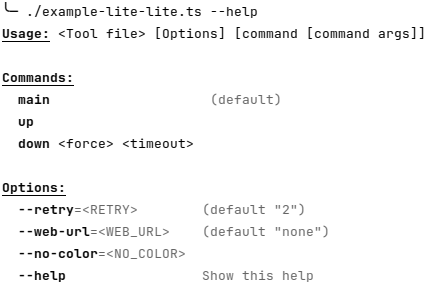
Plain text (without color and styles in markdown):
$ # with Deno : "deno run example-lite-lite.ts --help"
$ #          or if the is shebang is present:
$ ./example-lite-lite.ts --help
Usage: <Tool file> [Options] [command [command args]]

Commands:
  main                    (default)
  up
  down <force> <timeout>

Options:
  --retry=<RETRY>        (default "2")
  --web-url=<WEB_URL>    (default "none")
  --no-color=<NO_COLOR>
  --help                 Show this help
Run the commands with options and arguments
#                   ↓↓↓↓↓↓↓↓↓↓↓↓↓↓↓ options ↓↓↓↓↓↓↓↓↓↓↓ ↓command↓ ↓cmd args↓
$ ./example-lite.ts --retry=4 --web-url=tttt --no-color   down     true  14
down command { force: "true", timeout: "14" } Tool { retry: "4", webUrl: "tttt", no_color: true }

$ ./example-lite.ts down true 14
down command { force: "true", timeout: "14" } Tool { retry: 2, webUrl: "none", no_color: undefined }

$ ./example-lite.ts  --retry=4 --web-url=tttt --no-color
main command Tool { retry: "4", webUrl: "tttt", no_color: true }
Help description
Optional fields _<filed or method name>_desc are displayed as description in
the help :
#!/usr/bin/env -S deno run -A
import { cliteRun } from "jsr:@jersou/clite@0.3.1";

class Tool {
  _desc = "This tool is a little example of CliteParser"; // optional description
  retry = 2;
  webUrl = "none"; // fields are converted to kebab case as global options
  no_color?: string | boolean; // → --no-color
  _no_color_desc = "skip colorize"; // optional description for "no_color" field
  _up_desc = "create and start"; // optional description for "up" command

  main() {
    console.log("main command", this);
  }

  up() {
    console.log("up command", this);
  }

  down(force: boolean, timeout: number) {
    console.log("down command", { force, timeout }, this);
  }
}

if (import.meta.main) { // if the file is imported, do not execute this block
  cliteRun(new Tool());
}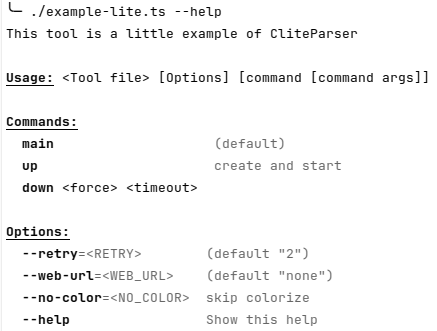
Plain text (without color and styles in markdown):
This tool is a little example of CliteParser

Usage: <Tool file> [Options] [command [command args]]

Commands:
  main                    (default)
  up                      create and start
  down <force> <timeout>

Options:
  --retry=<RETRY>        (default "2")
  --web-url=<WEB_URL>    (default "none")
  --no-color=<NO_COLOR>  skip colorize
  --help                 Show this help
Default command
- If there is only one method/command => this method is the default
- If the main method exist => main is the default
- else => no default method
$ ./example-lite.ts
main command Tool { retry: 2, webUrl: "none", no_color: undefined }
Ignore _* methods and fields (in the help)
Fields and methods that start with “_” are ignored.
_privateData = 12;
_privmethod() {
  console.log("this method is not visible in the help (starts with '_')");
}
Note: this “private” method can be run by the CLI, it’s useful during the development.
Note2: js private fields #* are also ignored :
#privateData = 12;
#privmethod() {
  console.log("this method is not visible in the help (starts with '#')");
}
Boolean options
$ ./example-lite.ts
main command Tool { retry: 2, webUrl: "none", no_color: undefined }
$ ./example-lite.ts --no-color
main command Tool { retry: 2, webUrl: "none", no_color: true }
$ ./example-lite.ts --no-color=false
main command Tool { retry: 2, webUrl: "none", no_color: "false" }
$ ./example-lite.ts --no-color=true
main command Tool { retry: 2, webUrl: "none", no_color: "true" }
CliteRunConfig
cliteRun(new Tool(), < optional CliteRunConfig > )
type CliteRunConfig = {
  args?: string[]; // default : Deno.args or process.argv.slice(2)
  dontPrintResult?: boolean; // default : false
  noCommand?: boolean; // default : false
};
Return value
If the method run by cliteRun return a value != undefined, it will be print in
stdout.
This behavior can be disabled with the config :
cliteRun(new Tool(), { dontPrintResult: true } )
noCommand
cliteRun(new Tool(), { noCommand: true }); → ./example-no-command.ts ---help
give :
This tool is a "no-command" example of CliteParser usage

Usage: <Tool file> [Options] [args]

Options:
  --retry=<RETRY>        (default "2")
  --web-url=<WEB_URL>    web URL ... (default "none")
  --no-color=<NO_COLOR>  skip colorize
  --help                 Show this help
Node support : npm install clite-parser
Usage from NPM
Run npx jsr add @jersou/clite and import with
import { cliteRun } from "@jersou/clite"; :
import { cliteRun } from "@jersou/clite"; // after "npx jsr add @jersou/clite"
class Tool { ... }
cliteRun(new Tool());
See node usage examples:
Usage with –experimental-network-imports NodeJS option (without npm install) :
Import directly by http :
// run with "node --experimental-network-imports ./example.mjs"
import { cliteRun } from "https://deno.land/x/clite_parser@0.2.2/clite_parser.mjs";
And run the script with:
$ node --experimental-network-imports ./example.mjsLinks
- https://jsr.io/@jersou/clite
- https://deno.land/x/clite_parser/
- https://www.npmjs.com/package/clite-parser
Playground
NodeJs
From https://stackblitz.com/edit/node-uywg3x?file=index.mjs&view=editor :
In the terminal :
$ node ./index.mjsor
$ chmod +x ./index.mjs
$ ./index.mjs
main command Tool { retry: 2, webUrl: 'none', no_color: undefined }
Deno
From https://codesandbox.io/p/devbox/clite-parser-deno-hw33ww?file=%2Findex.ts%3A8%2C1 see Terminal