NetBSD-UP 🚀

A simple command-line tool to start NetBSD virtual machines using QEMU with sensible defaults.
✨ Features
- 🖥️ Easy NetBSD VM setup: Launch NetBSD virtual machines with a single command
- 📥 Automatic ISO download: Downloads NetBSD ISO images from official CDN
- 🏷️ Version-aware: Specify NetBSD versions and automatically construct download URLs
- 🔄 Flexible input: Support for local ISO files, URLs, or version numbers
- ⚙️ Configurable VM settings: Customize CPU, memory, cores, and disk options
- ⚡ KVM acceleration: Automatically enables hardware virtualization for better performance
- 🌐 Network forwarding: SSH access via port 2222 on the host
- 💻 Serial console: No GUI required - works entirely in terminal
- 🔧 VM Management: Start, stop, inspect, and list virtual machines
- 💾 Persistent storage: SQLite database to track VM states and configurations
- 🏷️ Auto-naming: Automatic generation of unique VM names
- 🌉 Bridge networking: Support for custom network bridges
📋 Requirements
- 🦕 Deno runtime
- 🖥️ QEMU with KVM support
- 📥
curlfor downloading ISO images
🚚 Installation
# Clone the repository
git clone https://github.com/tsirysndr/netbsd-up.git
cd netbsd-up

# Make it executable
chmod +x main.ts
Run the following command to install the CLI:
deno install -A -g -r -f jsr:@tsiry/netbsd-up🎯 Usage
⭐ Basic Usage
Start a NetBSD 10.1 VM with default settings:
netbsd-up🏷️ Specify NetBSD Version
netbsd-up 10.1
netbsd-up 9.3
📁 Use Local ISO File
netbsd-up /path/to/netbsd.iso🌐 Download from Custom URL
netbsd-up https://cdn.netbsd.org/pub/NetBSD/images/10.1/NetBSD-10.1-amd64.iso🔧 VM Management Commands
List all running VMs:
netbsd-up psList all VMs (including stopped):
netbsd-up ps --allStart a stopped VM:
netbsd-up start <vm-name>Stop a running VM:
netbsd-up stop <vm-name>Inspect VM details:
netbsd-up inspect <vm-name>🖥️ Console Setup
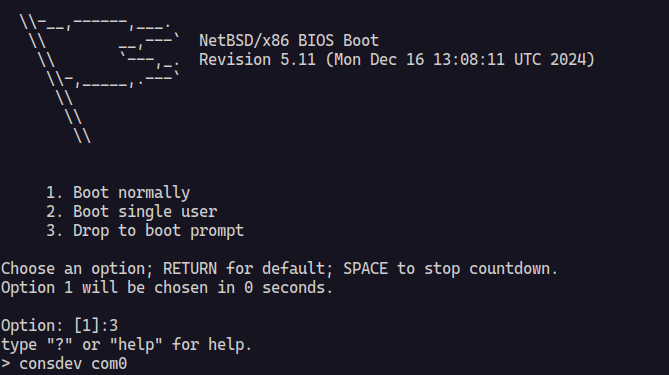
When NetBSD boots, you’ll see the boot menu. For the best experience with the serial console:
- 🔧 Select option
3. Drop to boot prompt - ⚙️ Configure console output:
consdev com0
boot
This enables proper console redirection to your terminal.
⚙️ Advanced Configuration
# Custom CPU, memory, and cores
netbsd-up --cpu host --memory 4G --cpus 4

# Save downloaded ISO to specific location
netbsd-up --output netbsd-10.1.iso

# Use existing disk image
netbsd-up --drive vm-disk.img --disk-format qcow2
🛠️ Command Line Options
| Option | Short | Description | Default |
|---|---|---|---|
--output |
-o |
Output path for downloaded ISO | Auto-generated |
--cpu |
-c |
CPU type to emulate | host |
--cpus |
-C |
Number of CPU cores | 2 |
--memory |
-m |
Amount of VM memory | 2G |
--drive |
-d |
Path to VM disk image | None |
--disk-format |
Disk image format | raw |
|
--size |
-s |
Size of the disk image to create if it doesn’t exist | 20G |
--bridge |
-b |
Name of the network bridge to use for networking (e.g., br0) | None |
🔧 VM Management Commands
| Command | Description |
|---|---|
netbsd-up ps |
List all running virtual machines |
netbsd-up ps --all |
List all virtual machines (including stopped) |
netbsd-up start <name> |
Start a stopped virtual machine |
netbsd-up stop <name> |
Stop a running virtual machine |
netbsd-up inspect <name> |
Show detailed information about a VM |
📚 Examples
⭐ Default NetBSD VM
netbsd-upStarts NetBSD 10.1 with 2 CPU cores and 2GB RAM.
🚀 High-Performance Setup
netbsd-up --cpus 8 --memory 8G --cpu host💾 Development Environment with Persistent Disk
# Create a disk image first
qemu-img create -f qcow2 netbsd-dev.qcow2 20G

# Start VM with the disk
./main.ts --drive netbsd-dev.qcow2 --disk-format qcow2
🔢 Specific versions
netbsd-up 10.1
netbsd-up 9.4
🔧 VM Management Examples
# List all running VMs
netbsd-up ps

# List all VMs including stopped ones
netbsd-up ps --all

# Start a specific VM by name
netbsd-up start my-netbsd-vm

# Stop a running VM
netbsd-up stop my-netbsd-vm

# Get detailed information about a VM
netbsd-up inspect my-netbsd-vm
🌐 Networking
The VM automatically sets up network forwarding:
- 🔑 SSH access:
ssh -p 2222 root@localhost - �️ The VM uses QEMU’s user-mode networking
📋 Version Format
NetBSD-UP recognizes version strings in the format:
- 🔢
MAJOR.MINOR(e.g.,10.1,9.3)
⚡ The tool automatically constructs the download URL for the official NetBSD release ISO.
⚙️ Default Settings
- 🏷️ NetBSD Version: 10.1
- 🖥️ CPU: host (uses host CPU features)
- 💾 Memory: 2GB
- ⚡ CPU Cores: 2
- 💿 Disk Format: raw
- 💾 Disk Size: 20GB (when creating new disk images)
- 🌐 Network: User-mode with SSH forwarding
- 🏷️ VM Names: Auto-generated unique names using random words
💾 Data Storage
NetBSD-UP uses a SQLite database to track virtual machine states and configurations. The database stores:
- VM names and unique identifiers
- CPU, memory, and disk configurations
- Network settings (bridge, MAC addresses)
- Current status (RUNNING, STOPPED)
- Creation timestamps
- Process IDs for running VMs
📄 License
See LICENSE file for details.
Contributing 🤝
Contributions are welcome! Please feel free to submit issues and pull requests.
Note
This tool is designed for development and testing purposes. For production NetBSD deployments, consider using proper installation methods.