A simple CLI tool to spin up OpenBSD virtual machines using QEMU with minimal fuss.
Attributes
Includes Deno configuration
Repository
Current version released
6 months ago
Dependencies
🐡 openbsd-up

A comprehensive CLI tool to manage OpenBSD virtual machines using QEMU with minimal fuss. Create, start, stop, and manage multiple OpenBSD VMs with persistent state tracking.
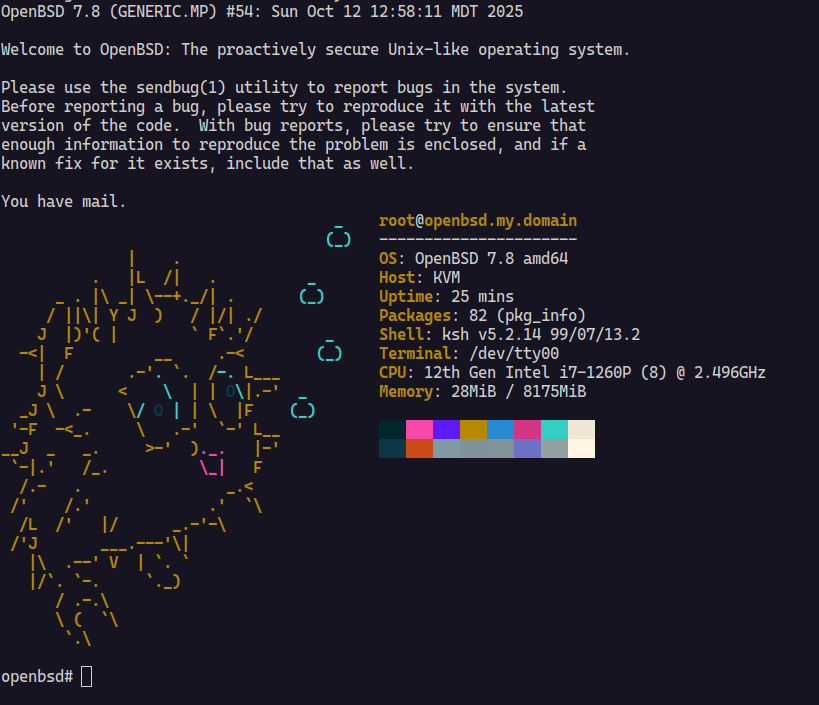
✨ Features
- 🚀 Quick Start: Launch OpenBSD VMs with a single command
- 📦 Auto-Download: Automatically fetches OpenBSD ISO images from official CDN
- 🔢 Version Support: Specify any OpenBSD version (e.g.,
7.8,6.4) - 💾 Flexible Storage: Support for persistent disk images in multiple formats with auto-creation
- ⚙️ Configurable: Customize CPU, memory, cores, and more
- 🌐 Network Ready: Support for both NAT (SSH port forwarding) and bridge networking
- 📝 Serial Console: Direct terminal access via
-nographicmode - 🗃️ VM Management: Persistent state tracking with SQLite database
- 📋 VM Lifecycle: Start, stop, list, and inspect VMs with unique names
- 🎯 Smart Detection: Automatically detects existing disk images to avoid data loss
- 🔗 Bridge Support: Automatic bridge network creation and QEMU configuration
🛠️ Requirements
- Deno runtime
- QEMU with KVM support (
qemu-system-x86_64) curlfor downloading ISOssudoaccess (for bridge networking only)
📥 Installation
deno install -A -g -r -f jsr:@tsiry/openbsd-up🎯 Usage
Basic Examples
# Launch latest default version (7.8) - creates a new VM with random name
openbsd-up

# Launch specific OpenBSD version
openbsd-up 7.6

# Use local ISO file
openbsd-up /path/to/openbsd.iso

# Download from custom URL
openbsd-up https://cdn.openbsd.org/pub/OpenBSD/7.8/amd64/install78.iso
VM Management
# List running VMs
openbsd-up ps

# List all VMs (including stopped)
openbsd-up ps --all

# Start a specific VM by name or ID
openbsd-up start my-vm-name

# Stop a running VM
openbsd-up stop my-vm-name

# Inspect VM details and configuration
openbsd-up inspect my-vm-name
Advanced Configuration
# Custom VM with persistent disk (auto-created if needed)
openbsd-up 7.8 \
  --cpus 4 \
  --memory 4G \
  --cpu host \
  --drive disk.img \
  --disk-format qcow2 \
  --size 40G

# Bridge networking (requires sudo)
openbsd-up 7.8 --bridge br0

# Save downloaded ISO to specific location
openbsd-up 7.8 --output ~/isos/openbsd-78.iso
🎛️ Command Line Options
Global Options
| Option | Short | Description | Default |
|---|---|---|---|
--output |
-o |
Output path for downloaded ISO | Auto-generated |
--cpu |
-c |
CPU type to emulate | host |
--cpus |
-C |
Number of CPU cores | 2 |
--memory |
-m |
RAM allocation | 2G |
--drive |
-d |
Path to persistent disk image | None |
--disk-format |
Disk format (qcow2, raw, etc.) | raw |
|
--size |
Size of disk image to create if it doesn’t exist | 20G |
|
--bridge |
-b |
Name of the network bridge to use for networking (e.g., br0) | None |
Subcommands
| Command | Description | Example |
|---|---|---|
ps |
List virtual machines | openbsd-up ps --all |
start <name> |
Start a stopped VM by name or ID | openbsd-up start my-vm |
stop <name> |
Stop a running VM by name or ID | openbsd-up stop my-vm |
inspect <name> |
Show detailed VM information and configuration | openbsd-up inspect my-vm |
🖥️ Console Setup
When OpenBSD boots, you’ll see the boot loader prompt, enter the following command:
set tty com0
boot
🔌 Networking
The tool supports two networking modes:
NAT Mode (Default)
- SSH Port Forward:
localhost:2222→ VM port22 - Network Device: Intel E1000 emulated NIC
- No special privileges required
Bridge Mode
- Direct Bridge Access: VM gets IP from bridge network
- Network Device: Intel E1000 emulated NIC with custom MAC
- Requires
sudoprivileges for QEMU bridge access - Automatically creates bridge network if it doesn’t exist
- Sets up QEMU bridge configuration in
/etc/qemu/bridge.conf
Connect via SSH after installation:
# NAT mode
ssh -p 2222 user@localhost

# Bridge mode (use VM's actual IP)
ssh user@<vm-ip-address>
�️ VM State Management
openbsd-up automatically tracks VM state using a SQLite database stored in
~/.openbsd-up/state.sqlite. Each VM gets:
- Unique ID: Auto-generated CUID for reliable identification
- Random Name: Human-readable names (e.g.,
ancient-butterfly) for easy reference - Persistent Config: CPU, memory, disk, and network settings preserved
- Status Tracking: RUNNING/STOPPED status with process ID tracking
- MAC Address: Consistent network identity across restarts
The state database allows you to:
- Resume VMs exactly as configured
- List all VMs with their current status
- Start/stop VMs by name or ID
- Inspect detailed VM configurations
�💡 Tips
- 🐏 Allocate at least 2GB RAM for smooth installation
- 💿 ISOs are cached - re-running with same version skips download
- 📀 Disk images are auto-created if
--drivepath doesn’t exist - 🔒 Tool detects non-empty disk images and skips ISO mounting to prevent data loss
- 🏷️ Use VM names for easy management:
openbsd-up start my-web-server - 🌉 Bridge networking requires sudo but provides direct network access
- 📊 Use
openbsd-up ps --allto see both running and stopped VMs
Creating Persistent VMs
# Create a VM with persistent storage
openbsd-up 7.8 --drive my-server.qcow2 --disk-format qcow2 --size 40G

# Later, restart the same VM (no ISO needed for installed systems)
openbsd-up start <vm-name>
🔧 Architecture
Built with modern TypeScript and Deno, featuring:
- CLI Framework: Cliffy for robust command-line interface
- Database: SQLite with Kysely query builder for type-safe operations
- State Management: Persistent VM state tracking with migrations
- Dependencies: Minimal runtime dependencies, leveraging Deno’s built-in capabilities
- Unique IDs: CUID2 for collision-resistant VM identifiers
- Human Names: Moniker for memorable VM names
📄 License
See LICENSE file for details. Licensed under Mozilla Public License v2.0.
🤝 Contributing
Issues and pull requests welcome!
Made with 🐡 for OpenBSD enthusiasts