FreeBSD-Up 🚀

A comprehensive FreeBSD virtual machine management tool built with Deno and QEMU. Effortlessly create, manage, and run FreeBSD VMs with persistent state tracking, network bridging support, and zero-configuration defaults.
✨ Features
Core VM Management
- 🏗️ Full VM lifecycle management: Create, start, stop, restart, inspect, and remove VMs
- 💾 Persistent state tracking: SQLite database stores VM configurations and state
- 📊 VM listing and monitoring: View running and stopped VMs with detailed information
- 🔍 VM inspection: Get detailed information about any managed VM
- 📋 VM logging: View and follow VM logs with built-in log management
- 🔄 VM restart: Gracefully restart VMs with preserved configuration
- 🗑️ VM removal: Clean removal of VMs from the database
- 🏷️ Auto-generated VM names: Unique identifiers for easy VM management
- 🏛️ Cross-platform support: Works on both x86_64 and aarch64 architectures
- 🔧 Background mode: Run VMs in detached mode for headless operation
Network & Storage
- 🌐 Flexible networking: Support for both user-mode and bridge networking
- 🔗 Network bridge support: Automatic bridge creation and management with
--bridge - 🖧 MAC address management: Persistent MAC addresses for each VM
- � Port forwarding: Custom port mapping for network services with
--port-forward - �💾 Persistent storage support: Attach and auto-create disk images
- 🗂️ Multiple disk formats: Support for qcow2, raw, and other disk formats
- 📏 Configurable disk sizes: Specify disk image size on creation
Convenience Features
- 🔗 Download and boot from URLs: Automatically downloads ISO images from remote URLs
- 📁 Local file support: Boot from local ISO files
- 🏷️ Version shortcuts: Simply specify a version like
14.3-RELEASEto auto-download - 🎯 Smart defaults: Run without arguments to boot the latest stable release (FreeBSD 14.3-RELEASE)
- ⚡ Zero configuration: Works out of the box with sensible defaults
- 🖥️ Serial console: Configured for headless operation with stdio console
- 💾 Smart caching: Automatically skips re-downloading existing ISO files
- 🆘 Help support: Built-in help with
--helpor-hflags - ⚙️ Configurable VM options: Customize CPU type, core count, memory allocation
- 📝 Enhanced CLI: Powered by Cliffy for robust command-line parsing
📋 Prerequisites
Before using FreeBSD-Up, make sure you have:
- Deno - Modern JavaScript/TypeScript runtime
- QEMU - Hardware virtualization
- KVM support (Linux) - For hardware acceleration (optional but recommended)
Installation on Common Systems
Ubuntu/Debian:
sudo apt-get update
sudo apt-get install qemu-system-x86 qemu-kvm
curl -fsSL https://deno.land/install.sh | sh
Fedora:
sudo dnf install qemu qemu-kvm
curl -fsSL https://deno.land/install.sh | sh
macOS:
brew install qemu denoRun the following command to install the CLI:
deno install -A -g -r -f jsr:@tsiry/freebsd-up🚀 Quick Start
Default Usage (Easiest)
Simply run without any arguments to boot the latest stable FreeBSD release:
freebsd-upThis will automatically download and boot FreeBSD 14.3-RELEASE.
Boot with Version Shortcut
Specify just a version to auto-download and boot:
freebsd-up 14.3-RELEASE
freebsd-up 15.0-BETA3
freebsd-up 13.4-RELEASE
Boot from URL
Download and boot from a specific URL:
freebsd-up https://download.freebsd.org/ftp/releases/amd64/amd64/ISO-IMAGES/15.0/FreeBSD-15.0-BETA3-amd64-disc1.isoBoot from Local File
freebsd-up /path/to/your/freebsd.isoVM Management Commands
List all running VMs:
freebsd-up psList all VMs (including stopped):
freebsd-up ps --allStart a specific VM:
freebsd-up start vm-nameStop a specific VM:
freebsd-up stop vm-nameInspect VM details:
freebsd-up inspect vm-nameRemove a VM:
freebsd-up rm vm-nameRestart a VM:
freebsd-up restart vm-nameView VM logs:
freebsd-up logs vm-nameFollow VM logs in real-time:
freebsd-up logs vm-name --follow### Customize VM Configuration
Specify custom CPU type, core count, memory allocation, persistent storage, networking, and port forwarding:
```bash
# Custom CPU and memory
freebsd-up --cpu host --memory 4G 14.3-RELEASE
# Specify number of CPU cores
freebsd-up --cpus 4 --memory 8G 15.0-BETA3
# Attach a disk image for persistent storage
freebsd-up --image ./freebsd-disk.img --disk-format qcow2 14.3-RELEASE
# Create disk image with specific size
freebsd-up --image ./freebsd-disk.qcow2 --disk-format qcow2 --size 50G 14.3-RELEASE
# Use bridge networking (requires sudo)
freebsd-up --bridge br0 14.3-RELEASE
# Configure port forwarding for specific services
freebsd-up --port-forward 8080:80,2222:22 14.3-RELEASE
# Run VM in background (detached mode)
freebsd-up --detach 14.3-RELEASE
# Download to specific location
freebsd-up --output ./downloads/freebsd.iso 15.0-BETA3
# Combine all options
freebsd-up --cpu qemu64 --cpus 2 --memory 1G --image ./my-disk.qcow2 --disk-format qcow2 --size 30G --bridge br0 --port-forward 8080:80,2222:22 --detach --output ./my-freebsd.isoGet Help
freebsd-up --help
# or
freebsd-up -h
Alternative Execution Methods
If you haven’t installed via deno install, you can run it directly with Deno:
deno run --allow-run --allow-read --allow-env -g -r -f main.ts -n freebsd-up🔧 Command Line Options
FreeBSD-Up supports several command-line options for customization:
VM Configuration Options
-c, --cpu <type>- CPU type to emulate (default:host)-C, --cpus <number>- Number of CPU cores (default:2)-m, --memory <size>- Amount of memory for the VM (default:2G)-i, --image <path>- Path to VM disk image for persistent storage--disk-format <format>- Disk image format: qcow2, raw, etc. (default:raw)-s, --size <size>- Size of disk image to create if it doesn’t exist (default:20G)
Network Options
-b, --bridge <name>- Name of the network bridge to use (e.g., br0)-p, --port-forward <mappings>- Port forwarding rules in the format hostPort:guestPort (comma-separated for multiple)
Execution Options
-d, --detach- Run VM in the background and print VM name
File Options
-o, --output <path>- Output path for downloaded ISO files
Management Commands
ps [--all]- List running VMs (use –all to include stopped VMs)start <vm-name> [--detach]- Start a specific VM by name (optionally in background)stop <vm-name>- Stop a specific VM by namerestart <vm-name>- Restart a specific VM by nameinspect <vm-name>- Show detailed information about a VMlogs <vm-name> [--follow]- View VM logs (optionally follow in real-time)rm <vm-name>- Remove a VM and its configuration from the database
Help Options
-h, --help- Show help information-V, --version- Show version information
Examples
# Use different CPU type
freebsd-up --cpu qemu64 14.3-RELEASE

# Allocate more memory
freebsd-up --memory 4G 15.0-BETA3

# Use more CPU cores
freebsd-up --cpus 4 14.3-RELEASE

# Attach a persistent disk image
freebsd-up --image ./freebsd-storage.qcow2 --disk-format qcow2 14.3-RELEASE

# Create a larger disk image automatically
freebsd-up --image ./freebsd-big.qcow2 --disk-format qcow2 --size 100G 14.3-RELEASE

# Use bridge networking for better network performance
freebsd-up --bridge br0 14.3-RELEASE

# Configure port forwarding for web and SSH access
freebsd-up --port-forward 8080:80,2222:22 14.3-RELEASE

# Run VM in background mode
freebsd-up --detach 14.3-RELEASE

# Save ISO to specific location
freebsd-up --output ./isos/freebsd.iso https://example.com/freebsd.iso

# Combine multiple options with bridge networking, port forwarding, and persistent storage
freebsd-up --cpu host --cpus 4 --memory 8G --image ./vm-disk.qcow2 --disk-format qcow2 --size 50G --bridge br0 --port-forward 8080:80,2222:22 --detach --output ./downloads/ 14.3-RELEASE

# List all VMs (including stopped ones)
freebsd-up ps --all

# Start a previously created VM
freebsd-up start my-freebsd-vm

# Start a VM in background mode
freebsd-up start my-freebsd-vm --detach

# Stop a running VM
freebsd-up stop my-freebsd-vm

# Restart a VM
freebsd-up restart my-freebsd-vm

# Get detailed information about a VM
freebsd-up inspect my-freebsd-vm

# View VM logs
freebsd-up logs my-freebsd-vm

# Follow VM logs in real-time
freebsd-up logs my-freebsd-vm --follow

# Remove a VM
freebsd-up rm my-freebsd-vm
🖥️ Console Setup
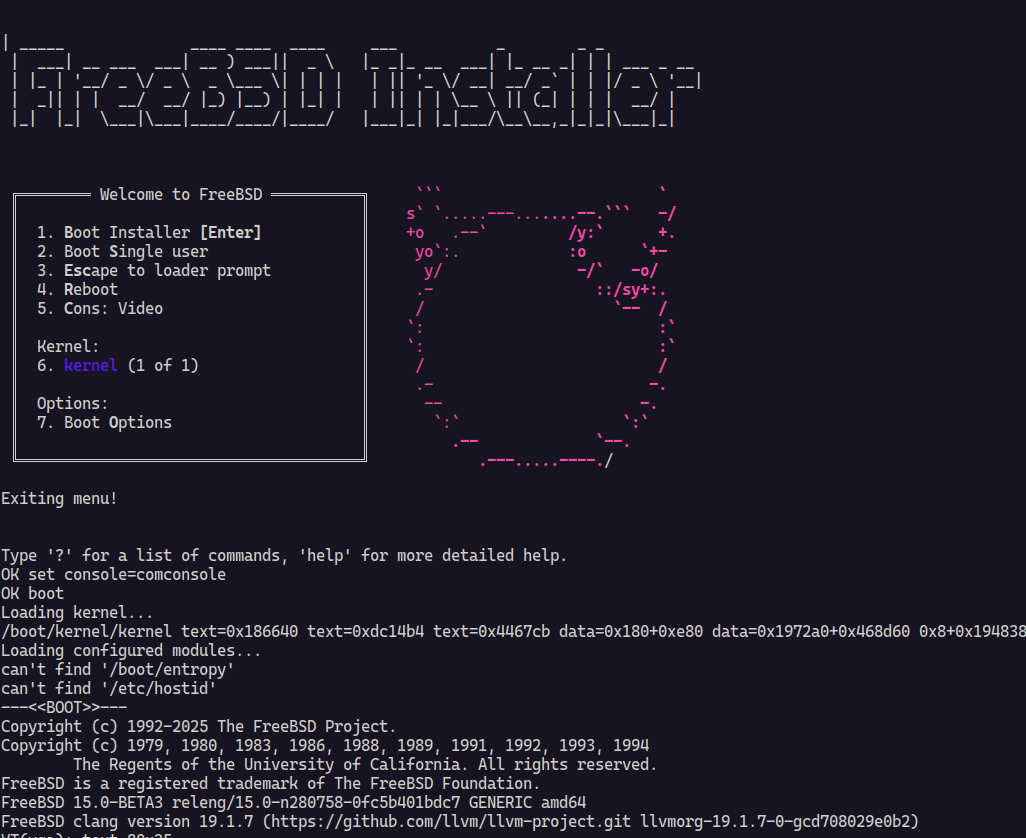
When FreeBSD boots, you’ll see the boot menu. For the best experience with the serial console:
- Select option
3. Escape to loader prompt - Configure console output:
set console="comconsole"
boot
This enables proper console redirection to your terminal.
⚙️ VM Configuration
The script creates a VM with the following default specifications:
- CPU: Host CPU with KVM acceleration (configurable with
--cpu) - Memory: 2GB RAM (configurable with
--memory) - Cores: 2 virtual CPUs (configurable with
--cpus) - Storage: ISO-only by default; optional persistent disk (configurable with
--image) - Network: User mode networking with SSH forwarding (host:2222 → guest:22)
or bridge networking with
--bridge - Port Forwarding: Configurable port mappings with
--port-forward - Console: Enhanced serial console via stdio with proper signal handling
- Default Version: FreeBSD 14.3-RELEASE (when no arguments provided)
- State Management: Persistent VM state stored in SQLite database
- Auto-naming: VMs get unique names for easy management
- Background Mode: Support for detached execution with
--detach
Networking Modes
FreeBSD-Up supports two networking modes:
- User Mode (Default): Port forwarding for SSH access (host:2222 → guest:22)
- Bridge Mode: Direct network access via bridge interface (requires
--bridgeand sudo)
VM State Management
All VMs are tracked in a local SQLite database with the following information:
- VM name and unique ID
- Hardware configuration (CPU, memory, cores)
- Network settings (bridge, MAC address)
- Storage configuration
- Current status (RUNNING, STOPPED)
- Process ID (when running)
- Creation timestamp
Available CPU Types
Common CPU types you can specify with --cpu:
host(default) - Use host CPU features for best performanceqemu64- Generic 64-bit CPU for maximum compatibilityBroadwell- Intel Broadwell CPUSkylake-Client- Intel Skylake CPUmax- Enable all supported CPU features
Available Disk Formats
Common disk formats you can specify with --disk-format:
raw(default) - Raw disk image format for maximum compatibilityqcow2- QEMU Copy On Write format with compression and snapshotsvmdk- VMware disk formatvdi- VirtualBox disk format
🔧 Customization
Modifying VM Settings via Command Line
The easiest way to customize VM settings is through command-line options:
# Increase memory to 4GB
freebsd-up --memory 4G

# Use a different CPU type
freebsd-up --cpu qemu64

# Increase CPU cores to 4
freebsd-up --cpus 4

# Add persistent storage
freebsd-up --image ./freebsd-data.qcow2 --disk-format qcow2 14.3-RELEASE

# Configure port forwarding for web server and SSH
freebsd-up --port-forward 8080:80,2222:22 14.3-RELEASE

# Run in background mode
freebsd-up --detach 14.3-RELEASE

# Combine options with persistent storage and port forwarding
freebsd-up --cpu host --cpus 4 --memory 8G --image ./vm-storage.qcow2 --disk-format qcow2 --port-forward 8080:80,2222:22 --detach 14.3-RELEASE
Creating Disk Images
Before using the --image option, you may need to create a disk image.
FreeBSD-Up can automatically create disk images for you:
# Automatically create a 20GB qcow2 disk image (default size)
freebsd-up --image ./freebsd-data.qcow2 --disk-format qcow2 14.3-RELEASE

# Create a larger 50GB disk image
freebsd-up --image ./freebsd-large.qcow2 --disk-format qcow2 --size 50G 14.3-RELEASE

# Manually create disk images with qemu-img
qemu-img create -f qcow2 freebsd-data.qcow2 20G
qemu-img create -f raw freebsd-data.img 10G
Setting up Bridge Networking
For bridge networking, you need to set up a bridge interface first:
# Create a bridge interface (requires root)
sudo ip link add br0 type bridge
sudo ip link set br0 up

# Add your network interface to the bridge
sudo ip link set eth0 master br0

# Then use FreeBSD-Up with bridge networking
freebsd-up --bridge br0 14.3-RELEASE
Note: Bridge networking requires sudo privileges and FreeBSD-Up will automatically create the bridge if it doesn’t exist.
Advanced Customization
To modify VM settings beyond command-line options, you can edit the QEMU
arguments in the relevant functions in src/utils.ts (for VM creation) or
src/subcommands/start.ts (for VM startup). The main.ts file serves as the CLI
entry point with subcommand routing.
Key architecture components:
- Modular design: Core functionality split into separate modules in
src/ - Database integration: SQLite database for persistent VM state management
(see
src/db.ts) - Subcommand structure: Dedicated commands for VM lifecycle operations in
src/subcommands/ - Network management: Automatic bridge setup and MAC address assignment in
src/network.ts - State tracking: Comprehensive VM state persistence across restarts in
src/state.ts
Supported Version Formats
The script automatically recognizes and handles these version formats:
14.3-RELEASE- Stable releases15.0-BETA3- Beta versions13.4-RC1- Release candidates- Any format matching:
X.Y-RELEASE|BETAX|RCX
To change the default version when no arguments are provided, modify the
DEFAULT_VERSION constant in main.ts.
📁 Project Structure
freebsd-up/
├── main.ts              # CLI entry point with Cliffy command routing
├── deno.json            # Deno configuration with dependencies
├── deno.lock            # Dependency lock file
├── README.md            # This file
└── src/                 # Core functionality modules
    ├── constants.ts     # Configuration constants
    ├── context.ts       # Application context and database setup
    ├── db.ts            # Database schema and migrations
    ├── network.ts       # Network bridge management
    ├── state.ts         # VM state management functions
    ├── types.ts         # TypeScript type definitions
    ├── utils.ts         # Core VM utilities and QEMU interface
    └── subcommands/     # CLI subcommand implementations
        ├── inspect.ts   # VM inspection command
        ├── logs.ts      # VM logging command
        ├── ps.ts        # VM listing command
        ├── restart.ts   # VM restart command
        ├── rm.ts        # VM removal command
        ├── start.ts     # VM start command
        └── stop.ts      # VM stop command
Dependencies
The project uses the following key dependencies:
- @paralleldrive/cuid2 - Unique ID generation for VMs
- @cliffy/command - Modern command-line argument parsing and subcommands
- @cliffy/table - Formatted table output for VM listings
- @db/sqlite - SQLite database for VM state persistence
- @soapbox/kysely-deno-sqlite - SQLite dialect for Kysely
- kysely - Type-safe SQL query builder
- chalk - Terminal styling and colors
- dayjs - Date formatting and manipulation
- lodash - Utility functions
- moniker - Unique name generation for VMs
🤝 Contributing
Contributions are welcome! Feel free to:
- Report bugs
- Suggest features
- Submit pull requests
- Improve documentation
📝 License
This project is licensed under the Mozilla Public License 2.0. See the LICENSE file for details.
🔗 Useful Links
Note
This tool is designed for development and testing purposes. For production FreeBSD deployments, consider using proper installation methods.