Chef
Personal package manager
Why it exists
This is useful for those binaries that are not packaged by a distro.
With chef you can:
- Install a random binary
- Keep it up-to-date
- Run it
- Automatically create desktop entries for GUI applications when specified in recipes
Quick Start (Zero Config)
Install Chef globally to manage your binaries from anywhere:
deno install -gA jsr:@sigmasd/chef

# Now you can use the chef command directly
chef gui
chef list
GUI Application
Chef comes with a GTK4 graphical user interface. You can install it as a permanent desktop application:
chef gui --install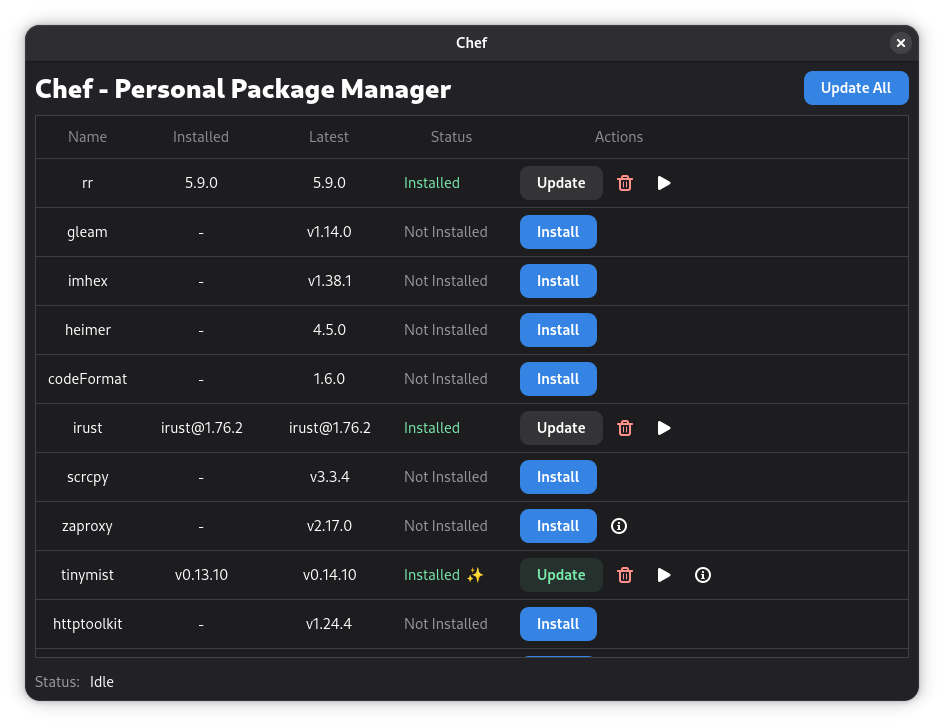
Customizing Recipes
By default, Chef uses a recipes file located in your cache directory. To
customize your recipes, you can create a local script (e.g., chef.ts):
import { $, Chef } from "jsr:@sigmasd/chef";
import { getLatestGithubRelease } from "jsr:@sigmasd/chef/utils";

const chef = new Chef();

chef.add({
  name: "irust",
  download: async ({ latestVersion }) => {
    await $.request(
      `https://github.com/sigmaSd/IRust/releases/download/${latestVersion}/irust-x86_64-unknown-linux-gnu`,
    ).showProgress().pipeToPath();
    await Deno.chmod("./irust-x86_64-unknown-linux-gnu", 0o555);
    return {
      exe: "./irust-x86_64-unknown-linux-gnu",
    };
  },
  version: () => getLatestGithubRelease("sigmaSd/IRust"),
  desktopFile: {
    comment: "Rust REPL",
    categories: "Development;",
    terminal: true,
  },
});

await chef.start(import.meta.url);
Running your custom script
# Run your script directly
deno run -A chef.ts list

# You can also install your custom script as the global 'chef' command
deno install -gA -n chef chef.ts
chef gui
Multiple Recipe Scripts
You can have multiple chef scripts for different purposes (e.g., lsp.ts,
work.ts). Each script manages its own set of binaries and settings
independently because of the import.meta.url passed to chef.start().
deno run -A lsp.ts update
deno run -A work.ts list
External Providers
Chef supports external providers, which allow you to integrate other package managers or custom binary sources. Providers are external commands that communicate with Chef using a JSON-based protocol.
You can use the Chef provider SDK to create your own providers.
Example provider: rustman (A provider for Rust binaries).
Managing Providers
# Add a provider
chef provider add rustman "deno run -A jsr:@sigmasd/rustman"

# List providers
chef provider list

# Remove a provider
chef provider remove rustman
Once a provider is added, its binaries will appear in chef list and can be
managed just like native recipes.
CLI Commands
chef updateto update all binarieschef listto list currently installed binarieschef run ${binary} $argsto run an installed binarychef link ${binary}to create a symlink in~/.cache/chef/exports(add this to your PATH!)chef gui [--install | --uninstall]manage the Chef GUI applicationchef desktop-file [create | remove] <binary>manually manage desktop entrieschef --versionshow chef version