BitArray
Written by Redu, with contributions by Atriace due to the question of “How do I create a bit array in JavaScript”.
This is a JavaScript class implementation of a BitArray extending DataView. It implements bit masks to access the bits which are technically stored as Bytes in the DataView. Conveniently, it also offers standard boolean operations.
Benefits of BitArray
BitArrayis developed with a performance first approach in mind. While indexed operations.at(i),.reset(i),.set(i)and.toggle(i)are expected to be slightly slower thanUint8ArrayorInt8Arraywhen other operations are concerned,BitArrayis many times faster or in par withTypedArrays andArrays. Accordingly an algorithm using a mix of both indexed and other operations may yield an overall higher performance.The memory footprint of
BitArrayis much smaller than any other type of arrays having the same number of elements.Since
BitArrayextendsDataView, all inherited methods like.getUint32()or.setUint8()etc. are available toBitArrays.
Constructor: BitArray(sizeOrBuffer)
sizeOrBuffer: Either a pre-existingArrayBufferor a positive integerNumber. In order to be able to deliver best performance, except for the indexed ones all properties or methods such as.popcnt,.all(),.clear(),.and()etc. use 32 bit access to the underlyingArrayBuffer. Accordingly theBitArray.buffer.byteLengthis always set to minimum multiples of 4 that is equal to or greater than the requested integer size. In casesizeOrBufferis ofArrayBuffertype and it’sbyteLengthis not a multiple of 4 then a newArrayBufferis generated in minimal correct size and the providedArrayBuffergets copied at it’s head. In theoryBitArrayshould allow sizes up to 34,359,738,336 (0x07ffffffe0).
Syntax
new BitArray(buffer);
new BitArray(number);
Examples
Starting with something simple…
var a = new BitArray(10);
a.set(0);
a.set(3);

console.log(`${a}`); // 10010000000000000000000000000000
a.length;            // 32
a.size;              // 10
a.popcnt;            // 2
Static Methods
BitArray.from(): Converts either anArraywithunknown[]type or anArrayBufferViewtype according to the elements being truthy or falsey. Thelengthof the constructedBitArrayis adjusted according to the rule mentioned above.BitArray.isBitArray(): Returnstrueif the provided argument is ofBitArraytype.BitArray.isConvertable(): Returnstrueif the provided argument is either aBitArrayor anArrayBufferViewtype.
Properties
length: An immutable property returning the actual length of theBitArray. All operations are performed up to thelengthby the exception of convertions back toArrays orTypedArrayswhich are done up to thesizeas explained below.popcnt: Returns the total number of 1s in theBitArray.size: An immutable property returning the requested size at construction time. Although you may set bits beyond thesizevalue up to thelengthany convertions back toArrays orTypedArrays are limited to thesizeproperty value. Accordingly if you intend to make such convertions then it would be wise to not populate theBitArraybeyond it’ssize.
Methods
Tests
.all(): Returnstrueif all bits in theBitArrayare set.
var a = new BitArray(10);
a.fill();  // 11111111111111111111111111111111
a.all();   // true
a.reset(7);// 11111110111111111111111111111111
a.all(); // false .any(): Returnstrueif any of the bits in theBitArrayare set. If returnsfalsethen all bits are 0.
var a = new BitArray(10);
a.any();   // false
a.set(7);  // 00000001000000000000000000000000
a.any(); // true .isEqual(): Returnstrueif testedBitArrays have the same bits set.
var a = new BitArray(10),
    b;
a.randomize(); // 10001111001101010101001100111100
b = a.slice(); // 10001111001101010101001100111100
a.isEqual(b);  // true
Logical Operators
.and(bar, inPlace = false): And ofthisandbar. Example: 1100 & 1001 = 1000. IfinPlaceis set totruethen the operation is performed in place (thisholds the result).
var a = new BitArray(10),
    b = new BitArray(37),
    c;

a.length;  // 32
a.size;    // 10
b.length;  // 64
b.size;    // 37

a.set(7);  // 00000001000000000000000000000000
a.set(8);  // 00000001100000000000000000000000
b.set(8);  // 0000000010000000000000000000000000000000000000000000000000000000

a.and(b);  // 00000001000000000000000000000000
b.and(a);  // 0000000100000000000000000000000000000000000000000000000000000000
.not(inPlace = false): Flips all the bits in this buffer. Example: 1100 = 0011. IfinPlaceis set totruethen the operation is performed in place (thisholds the result)..or(bar, inPlace = false): Or of this and bar. Example: 1100 & 1001 = 1101. IfinPlaceis set totruethen the operation is performed in place (thisholds the result)..xor(bar, inPlace = false): Xor of this and bar. Example: 1100 & 1001 = 0101. IfinPlaceis set totruethen the operation is performed in place (thisholds the result).
Modifiers
.clear(): Resets theBitArrayin place..fill(): Sets theBitArrayin place..randomize(): Sets or resets every bit in theBitArrayrandomly in place.reset(i): Resets the value at given indexi..set(i): Sets the value at given indexi..toggle(i): Flips the value at given indexi.
Others
.slice(a = 0, b = this.buffer.byteLength): SlicesBitArrayand returns a newBitArraywithbuffer.byteLengthin multiples of 4 bytes (32 bits). Pay attention that the arguments are in byte unit. When invoked with no arguments, the default argument values instantiate a clone..toString(): Returns the string representation of theBitArray.
Converting from a BitArray into an Array or TypedArray
Since BitArray is an iterable object, converting it into an Array is easily achieved by the spread operator. Conversion into TypeArrays is done by the TypedArray.from(BitArray) method as follows…
var a = new BitArray(10),
    b,
    c;
a.set(0);
a.set(3);

console.log(`${a}`);    // 10010000000000000000000000000000
a.length;               // 32

b = [...a];             // [1,0,0,1,0,0,0,0,0,0,0,0,0,0,0,0,0,0,0,0,0,0,0,0,0,0,0,0,0,0,0,0,]
c = Uint8Array.from(a); // Uint8Array(32) [1,0,0,1,0,0,0,0,0,0,0,0,0,0,0,0,0,0,0,0,0,0,0,0,0,0,0,0,0,0,0,0, buffer: ArrayBuffer(32), byteLength: 32, byteOffset: 0, length: 32, Symbol(Symbol.toStringTag): 'Uint8Array']
Using DataView Access
Since BitArray is just an extension of the DataView object, all of it’s methods are inherited and at your service for free. However remember that, while reading or manipulating a BitArray’s ArrayBuffer through the inherited methods you should use byte indexed access.
Benchmarks
We bench a meaningful usecase of BitArray employed in an Optimized Segmented Sieve of Sundaram based single threaded PI function which returns the count of prime numbers up to a number n. Tests are run for 0 to different n values from 1000 to 1,000,000,000 both for Array, BitArray and Uint8Array. Benchmarking is done by Deno’s built in benchmarking tool. So just run
/path-to-project$ deno bench --unstable
at the root of the project to see it for yourself.
| N | Array (ms) | Uint8Array (ms) | BitArray (ms) |
|---|---|---|---|
| 1000 | 0.0046 | 0.00476 | 0.00422 |
| 10000 | 0.04627 | 0.04201 | 0.03537 |
| 100000 | 0.5577 | 0.50201 | 0.45837 |
| 1000000 | 6.71 | 6.29 | 6.22 |
| 10000000 | 66.81 | 60.24 | 59.61 |
| 100000000 | 937.57 | 650.42 | 680.7 |
| 1000000000 | 10540 | 7430 | 7920 |
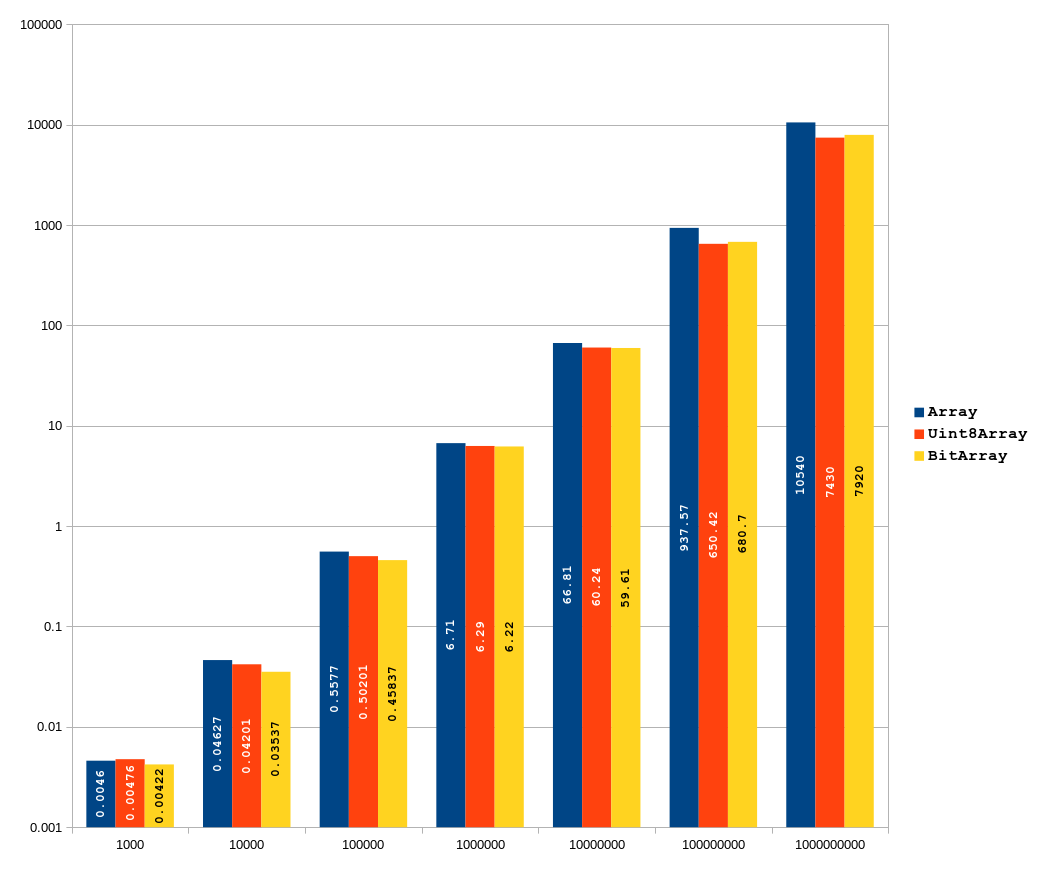
Keep in mind that both axis are in logaritmic scale. Although the length of the bars seems to be close, Array performs very bad especially when the size exceeds 33,554,433 limit (> 2²⁵) at which point Array reaches to ~268MB memory limit and it’s internal structure gets switched to NumberDictionary[16] yielding a dramatic slowdown of the V8 engine. BitArray and Uint8Array don’t get effected from this phenomenon. In fact BitArray should be using only ~4MB of memory at this point.
As seen from the above data and chart BitArray is faster or in par with Uint8Array. Besides we have to remember that BitArray has 1/8 of the memory footprint of an Uint8Array.
TODO
- With hopes to improve the performance of
BitArrayfurther, in the upcoming version I plan to include a WASM module to kick in after a certain size.