Barebones Static Site Generator (BBSSG)
Sometimes you don’t need a static site generator that comes with a templating language, MBs or even GBs of dependencies and a hundred lines of config.
BBSSG takes markdown content (no frontmatter here!) places it into an HTML template and performs some link matching. That’s it!
It’s built in deno so you don’t need another node_modules folder filling up your hard drive and only adds ~100 lines of my shonky code to tie libraries together (written by much smarter, less shonky people).
Install
Initialise a site with:
deno run --unstable --allow-read --allow-write https://deno.land/x/bbssg@v1.2.1/cli.ts initialise --gitignore --package --workflowYes, that --unstable looks scary, unfortunately, a majority of the deno fs module currently requires it.
Note the --gitignore, --package and --workflow flags:
--gitignoreadds the./distdirectory to your.gitignorefile--packageadds thebuildscript to generate a BBSSG site--workflowadds apublish.ymlworkflow to.github/workflowsto provide publish-on-commit functionality
Additionally, if you don’t want to initialise the source files, you can pass --nosrc.
Manual
- Create
./src/template.html- You can copy the contents of
index.htmlor… - Check the Customising the template section to put together your own template
- You can copy the contents of
- Create
./src/content/index.md - The
yarn buildornpm run buildcommands mentioned below are aliases ofdeno run --unstable --allow-read --allow-write https://deno.land/x/bbssg@v1.2.1/cli.ts generate
- The site is generated in a
./distdirectory, so optionally add/distto.gitignore - The
publish.ymlcan be copied in place into your site repo
Customise
If any of the functionality or behaviour described below doesn’t suit your needs, but you still want to use BBSSG, grab generate.ts from this repo (or clone the whole thing) and tweak as necessary. You can then run it
Usage
Generate the site
- Add or change content in the
src/contentfolder - Run
yarn buildornpm run build
The default template is set up to use Water.css, which does a good job of styling semantic HTML.
index.md will be used for the content on the index.html of your site. All other content files will be added as index.html files within a directory using the same file name as the file. For example
- src
    - content
        index.md
        about.md
        contact.md
…results in…
- dist
    index.html
    - about
        index.html
    - contact
        index.html
Serving from a non-root location
If your site is hosted from a non-root location (such as andrewbridge.github.io/bbssg/), you can use the --base flag like yarn build --base /bbssg or npm run build --base /bbssg. You can also add this into your build command. Check the build command for this repository in package.json for an example.
Customising the template
The template, src/template.html, is the only other required file. Any global elements, such as a navbar, should go here. There’s no automated generated of the navbar, it’s all manual, but that provides you simple and complete control for the small price of this manual work.
Anything else found in the src directory will be copied verbatim to the generated site. Stylesheets or javascript you want to link to in the template will be in the same location on the final site. Make sure your references are all absolute or from the site’s root. In this example, the assets directory is used for stylesheets for neatness, but it is not required.
The {%PAGE_CONTENT%} placeholder can be used once, anywhere in the template.
Page title
The page title will be inferred from the file name or the first H1 on the generated page. Currently the {%PAGE_TITLE%} placeholder will only be replaced in the title element of the page.
Link matching
Any link on the generated page that matches the URL of the page being generated will had an “active” class added to it. It’s up to you to handle any visual changes in your CSS.
Publishing
Install the github workflow using the initialise --workflow parameter as described in the Install section.
The workflow publishes the generated site to the gh-pages branch of your repo. To point GitHub Pages at your site, select gh-pages as your GitHub Pages branch in your repository settings.
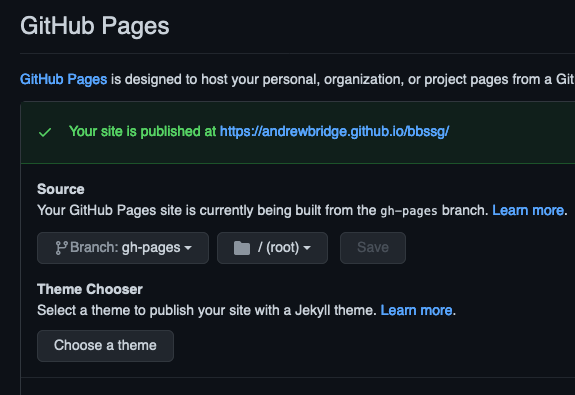
This repository has the workflow running on any push to the main branch. The example site is served at andrewbridge.github.io/bbssg
Development
As this is a barebones generator, the development situation is pretty barebones too. Rather than setting up a built in file watcher, I use watchexec which is a fantastic general purpose file watcher. If you have this installed, run yarn dev or npm run dev to run the build every time a non dist file changes.
If you need to serve the site, yarn serve or npm run serve will run a simple HTTP server of the dist directory at http://localhost:8000.
There’s no live reloading or hot reloading here, so be ready to hit that refresh button!
Deployment
We rely on access to files from this repository during initialisation. Because of the remote nature of deno modules, we need to flatten files into a JS module in order to do so. When a non-js file has changed, run yarn updateTemplate to update the file module used during initialisation.
We host BBSSG from deno.land, which needs a new tag in the repository in order to update the package. For the same reason, each time we need to push to deno.land, we need to bump the version number used in this README.md and in package.json in order to keep everything aligned.