
Message sent? Done!


Done: Your straightforward message queue solution, open-source and self-hosted on Deno Deploy.
Key features:
- Open Source
- Self-Hosting via Deno Deploy
- Delayed messages without limits
- Retry handling
- Failure-Callbacks
- Dead Letter Queues
Content
- Introduction
- Storage
- Quick Start
- Messages
- Setup on Deno Deploy
- API Endpoints
- Dashboard
- Roadmap
- What about Deno’s native queue?
- Credits
- Who is DNL
- Feedback
- License
Introduction
Done isn’t just another message queue service; it’s a celebration of simplicity and open-source ingenuity. It’s perfect for those who like their tech like they like their coffee: strong, straightforward, and capable of keeping you up at night (in a good way, we promise!).
Embrace the open-source simplicity with Done. Queue up, have fun, and get it done!
- 📡 RESTful API, Joyful You: Manage your queues with a RESTful API that’s as simple as a light switch – on, off, and awesome.
- 🧰 No-Frills, All Thrills: We’ve cut the fluff, leaving you with a lean, mean, message-queuing machine.
- 🦕 Deno-Deploy-Powered: With its foundation in Deno, Done is as awesome as a dinosaur rocking shades. That’s right, we’re keeping it that cool ;)
Storage
Done supports two storage backends, each with distinct strengths:
🏆 Turso (Recommended for Production)
Why Turso? When you’re managing data relationships, dependencies, and complex queries, SQL is your best friend. Turso gives you the power of SQLite with global distribution - perfect for applications that need to scale and manage interconnected data efficiently.
- Local Development: Use
:memory:for testing orfile:local.dbfor persistent local development - Production: Deploy to Turso’s global edge network with automatic replication
- Data Management: Full SQL capabilities for complex queries, relationships, and data integrity
- Scalability: Built for production workloads with edge distribution
- Migration Support: Built-in schema migrations for evolving your data structure
# Recommended production setup
STORAGE_TYPE=TURSO
TURSO_DB_URL=https://your-db.turso.io
TURSO_AUTH_TOKEN=your-auth-token

# Local development options
TURSO_DB_URL=:memory:           # For testing
TURSO_DB_URL=file:local.db      # For persistent local dev
⚡ Deno KV (Built-in Simplicity)
When to use KV? Perfect for simple use cases where you need zero setup and minimal configuration. KV excels at key-value operations but isn’t designed for managing complex data relationships or dependencies.
- Zero Setup: Works out of the box with Deno Deploy
- Simple Operations: Great for basic CRUD operations
- Built-in: No external dependencies required
- Limitations: Not ideal for complex data relationships or advanced querying
# Simple setup - works immediately
STORAGE_TYPE=KV  # This is the fallback default
🤔 Which Should You Choose?
- Choose Turso if you’re building a production application, need data relationships, want SQL querying power, or plan to scale beyond basic message queuing
- Choose KV if you want absolute simplicity, are prototyping, or have minimal data management needs
Our Recommendation: Start with Turso for any serious project. The migration system and SQL capabilities will serve you well as your application grows. KV is fantastic for getting started quickly, but Turso provides the foundation for long-term success.
To configure your storage backend:
# Set your preferred storage type
STORAGE_TYPE=TURSO  # or 'KV' for simplicity

# Required for Turso (production)
TURSO_DB_URL=https://your-db.turso.io
TURSO_DB_AUTH_TOKEN=your-auth-token
Quick Start
1. Get Turso Setup (Recommended)
# Install Turso CLI
curl -sSfL https://get.tur.so/install.sh | bash

# Create your database
turso db create done-db

# Get your database URL and auth token
turso db show done-db --url
turso db tokens create done-db
2. Environment Configuration
Create a .env.local file for development:
# Storage configuration (recommended)
STORAGE_TYPE=TURSO
TURSO_DB_URL=:memory:  # or your Turso URL for production
TURSO_AUTH_TOKEN=your-token-here

# Authentication
AUTH_TOKEN=your-secret-auth-token

# Optional: Enable detailed logging
ENABLE_LOGS=true
3. Run Locally
# Clone the repository
git clone https://github.com/dnl-fm/done.git
cd done

# Run with environment file
deno task dev
4. Test Your Setup
# Send a test message
curl -X POST 'http://localhost:3001/v1/https://httpbin.org/post' \
  -H 'Authorization: Bearer your-secret-auth-token' \
  -H 'Content-Type: application/json' \
  -H 'Done-Delay: 10s' \
  -d '{"message": "Hello from Done!"}'
Ready to deploy? Check out the Setup on Deno Deploy section below! 🚀
Messages
Absolute Delay
await fetch('https://your-done-host.com/http://your-callback-url.com/some-path/123456789', {
  method: 'POST',
  headers: {
    'Authorization': 'Bearer ******',
    'Done-Not-Before': 1700902800, // 2023-11-25T09:00:00Z
    'Content-type': 'application/json'
  },
  body: JSON.stringify({name: 'Foo Bar', email: 'foo@bar.com'})
});
Expected response You will receive a message-id as well as the set date of callback.
201 Created

{
  "id": "msg_ytc6tbklsjmurie7ppxtqfnreh",
  "publish_at": "2023-11-25T09:00:00Z"
}
Expected callback at 2023-11-25T09:00:00Z
Your actual callback message.
POST http://your-callback-url.com/some-path/123456789
done-message-id: msg_ytc6tbklsjmurie7ppxtqfnreh
done-status: deliver
done-retried: 0
user-agent: Done Light

{
  "name": "Foo Bar",
  "email": "foo@bar.com"
}
Relative Delay
You sent a request at 2023-11-25T09:00:00Z.
await fetch('https://your-done-host.com/http://your-callback-url.com/some-path/123456789', {
  method: 'POST',
  headers: {
    'Authorization': 'Bearer ******',
    'Done-Delay': '5m', // in 5 minutes
    'Content-type': 'application/json'
  },
  body: JSON.stringify({name: 'Foo Bar', email: 'foo@bar.com'})
});
Expected response You will receive a message-id as well as the calculated date of callback.
201 Created

{
  "id": "msg_ytc6tbklsjmurie7ppxtqfnreh",
  "publish_at": "2023-11-25T09:05:00Z"
}
Expected callback at 2023-11-25T09:05:00Z
Your actual callback message.
POST http://your-callback-url.com/some-path/123456789
done-message-id: msg_ytc6tbklsjmurie7ppxtqfnreh
done-status: deliver
done-retried: 0
user-agent: Done Light

{
  "name": "Foo Bar",
  "email": "foo@bar.com"
}
Delay format
The format for this type of delay is <number><unit>. Valid units are:
- seconds (s)
- minutes (m)
- hours (h)
- days (d)
Some delay examples:
10s(enough to catch your breath),5m(perfect for a quick coffee),20m(ideal for a power nap),2h(great for binge-watching your favorite show),14d(for those who plan way ahead).
Immediate messages
No Delay header? No delay! Done will callback immediately as it receives the message. You sent a request at 2023-11-25T09:00:00Z.
await fetch('https://your-done-host.com/http://your-callback-url.com/some-path/123456789', {
  method: 'POST',
  headers: {'Authorization': 'Bearer ******'}
});
Expected response You will receive a message-id as well as the calculated date of callback.
201 Created

{
  "id": "msg_ytc6tbklsjmurie7ppxtqfnreh",
  "publish_at": "2023-11-25T09:00:00Z"
}
Expected callback immediate after 2023-11-25T09:00:00Z
Your actual callback message.
POST http://your-callback-url.com/some-path/123456789
done-message-id: msg_ytc6tbklsjmurie7ppxtqfnreh
done-status: deliver
done-retried: 0
user-agent: Done Light
Callback headers
You can attach callback headers which Done will integrate when calling you back. Just flag these with Done-.
// callback headers

await fetch('https://your-done-host.com/http://your-callback-url.com/some-path/123456789', {
  method: 'POST',
  headers: {
    'Authorization': 'Bearer ******',
    'Content-type': 'application/json',
    'Done-Authorization': 'Bearer *********'
    'Done-Foo': 'bar',
  },
  body: JSON.stringify({name: 'Foo Bar', email: 'foo@bar.com'})
});
Expected callback message
POST http://your-callback-url.com/some-path/123456789
Authorization: Bearer *********
foo: bar
done-message-id: msg_ytc6tbklsjmurie7ppxtqfnreh
done-status: deliver
done-retried: 0
user-agent: Done Light

{
  "name": "Foo Bar",
  "email": "foo@bar.com"
}
Retries and Failure-Callback
By default Done will try 3 times to call the specified message url. If that does not work and the message included a Done-Failure-Callback-header it will try to send the message to that given URL before moving it to the Dead Letter Queue.
await fetch('https://your-done-host.com/http://your-callback-url.com/some-path/123456789', {
  method: 'POST',
  headers: {
    'Authorization': 'Bearer ******',
    'Content-type': 'application/json',
    'Done-Failure-Callback': 'http://your-callback-url.com/failure/123456789',
  },
  body: JSON.stringify({name: 'Foo Bar', email: 'foo@bar.com'})
});
Setup on Deno Deploy
1. Create Your Deno Deploy Project
Setup a project over at Deno Deploy. You can either:
- Deploy Done directly by uploading the code
- Connect it with your GitHub repository for automatic deployments (recommended)
2. Configure Environment Variables
In your Deno Deploy project settings, add these environment variables:
Required Variables
# Authentication (required)
AUTH_TOKEN=your-super-secret-auth-token

# Storage type (recommended: Turso)
STORAGE_TYPE=TURSO

# For Turso storage (recommended for production)
TURSO_DB_URL=https://your-db.turso.io
TURSO_AUTH_TOKEN=your-turso-auth-token
Optional Variables
# Enable detailed logging (saves KV writes if using KV storage)
ENABLE_LOGS=true

# Only if using KV storage (not recommended for production)
STORAGE_TYPE=KV  # Fallback option
3. Turso Production Setup
For production deployments with Turso:
Create a production database:
turso db create done-production
Get your production URL and token:
turso db show done-production --url
turso db tokens create done-production
Set up replica locations (optional, but recommended):
turso db replicate done-production --location fra
turso db replicate done-production --location nrt
Add the credentials to Deno Deploy environment variables
4. Deploy and Test
Once deployed, test your setup:
curl -X POST 'https://your-deploy.deno.dev/v1/https://httpbin.org/post' \
  -H 'Authorization: Bearer your-super-secret-auth-token' \
  -H 'Content-Type: application/json' \
  -H 'Done-Delay: 30s' \
  -d '{"message": "Hello from production!"}'
Pro tip: Use the Bruno collection in docs/bruno-collection/ to test all endpoints systematically! 🚀
With Turso, you get a globally distributed, production-ready setup that scales with your needs. Like having a perfectly organized digital infrastructure that works worldwide! 🌍
API Endpoints
Done provides comprehensive API endpoints to manage and monitor your message queue. These are your tools for inspecting data, debugging issues, and understanding your message flow.
📚 View Interactive API Documentation - A complete Swagger-style reference with all endpoints, parameters, and examples!
Core Message Operations
🚀 Send Messages
POST /v1/{callback-url}- Queue a message for delivery- Headers:
Done-Delay,Done-Not-Before,Done-*(custom callback headers) - Returns: Message ID and scheduled delivery time
📋 Inspect Messages
GET /v1/{message-id}- Fetch specific message detailsGET /v1/by-status/{status}- List messages by status (CREATED, QUEUED, DELIVERED, FAILED)- View message payload, status, retry count, and scheduling information
Administrative & Monitoring Tools
📊 System Health
GET /v1/system/ping- Health check (no auth required)GET /v1/system/health- Detailed system status with storage info
📈 Analytics & Stats
GET /v1/admin/stats- Get comprehensive queue statistics- Message counts by status
- Success/failure rates
- Storage utilization
- Processing metrics
🔍 Data Inspection
GET /v1/admin/raw- Browse raw data with filtering- Query parameters:
matchfor filtering,limitfor pagination - Inspect the underlying data structure
- Debug storage issues
- Query parameters:
📝 Activity Logs (when ENABLE_LOGS=true)
GET /v1/admin/logs- View all system activity logsGET /v1/admin/log/{message-id}- Get detailed logs for specific message- Track message lifecycle events
- Debug delivery issues
- Monitor retry attempts
🧹 Data Management
DELETE /v1/admin/reset- Reset all messages (dev/testing)DELETE /v1/admin/reset/logs- Clear only logs (when supported)- Query parameters:
matchfor selective deletion
Testing & Development
🧪 Test Your Setup
Use gotrequests.com to simulate and inspect callbacks before connecting your real endpoints. It’s like having a sandbox to see exactly how Done will call your services!
📚 Bruno Collection
All endpoints are documented as a Bruno collection with:
- Ready-to-use requests for all endpoints
- Environment configurations for Dev/Stage/Prod
- Example payloads and expected responses
Expected API Responses
Message Creation Success:
{
  "id": "msg_abc123def456",
  "publish_at": "2024-01-15T14:30:00Z"
}
Statistics Overview:
{
  "messages": {
    "total": 1247,
    "created": 12,
    "queued": 8,
    "delivered": 1180,
    "failed": 47
  },
  "storage_type": "TURSO"
}
Message Details:
{
  "id": "msg_abc123def456",
  "status": "DELIVERED",
  "url": "https://your-app.com/webhook",
  "payload": {"user": "john", "action": "signup"},
  "retry_count": 1,
  "publish_at": "2024-01-15T14:30:00Z",
  "created_at": "2024-01-15T14:25:00Z"
}
These endpoints give you complete visibility into your message queue operations - perfect for monitoring, debugging, and understanding your application’s messaging patterns! 🔍
Dashboard
Done comes with a built-in web dashboard for monitoring and managing your message queue! Access it at /dashboard on your deployment.
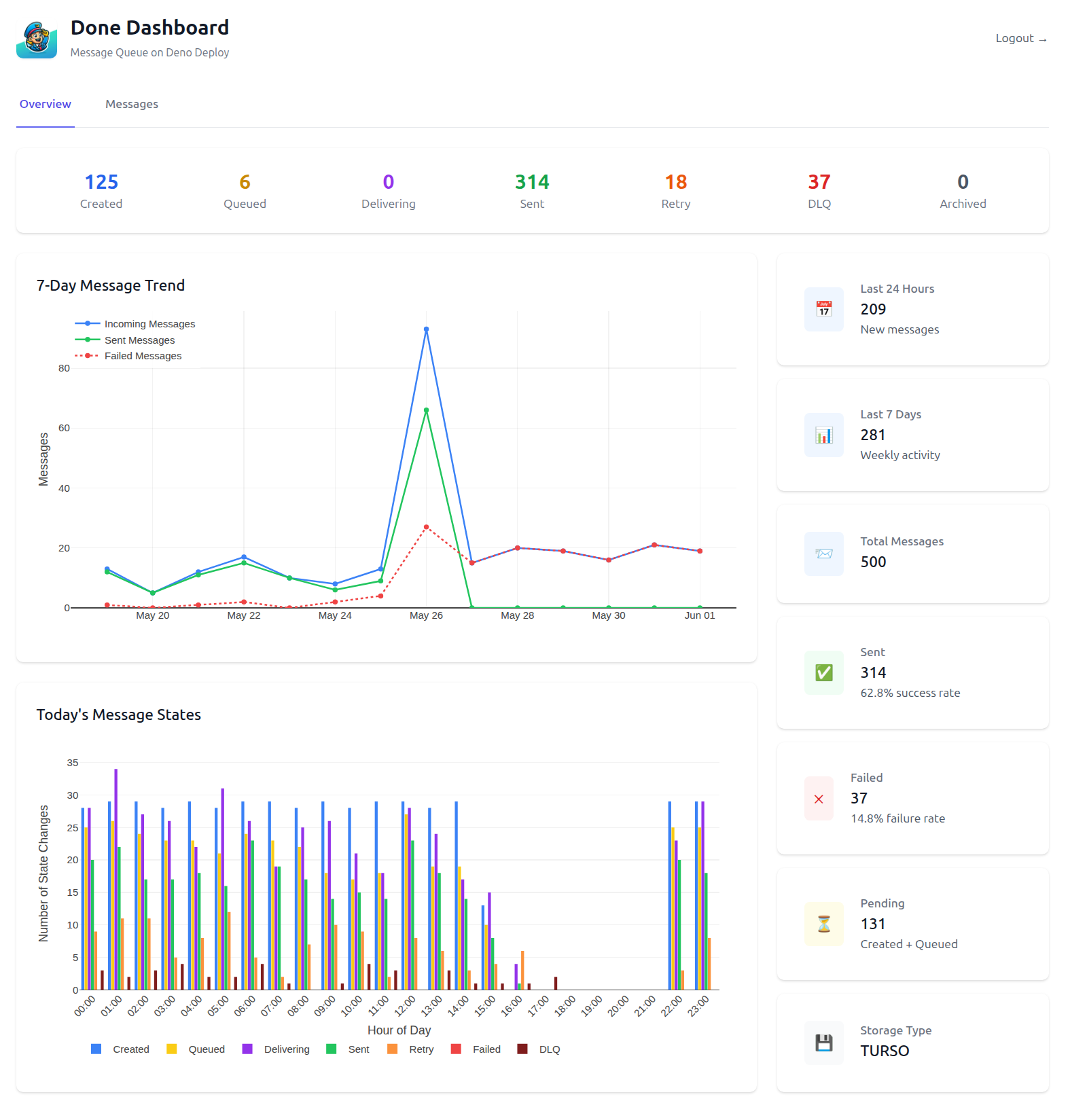
Features
- Real-time Statistics: Monitor message counts by status, success rates, and failure rates
- 7-Day Message Trend: Visualize incoming, sent, and failed messages over the past week
- Hourly State Distribution: See how messages progress through states throughout the day
- Message Browser: Search and inspect individual messages with full details
- Message Recreation: Easily recreate failed messages with one click
- Activity Timeline: Track the complete lifecycle of each message
Authentication
The dashboard is protected by authentication. Use your AUTH_TOKEN to log in:
- Navigate to
/dashboard - Enter your
AUTH_TOKEN(same as API authentication) - Session lasts 24 hours with secure HTTP-only cookies
- Logout available from the dashboard header
Dashboard Views
- Overview: High-level metrics and charts showing system health
- Messages: Browse all messages with filtering and pagination
- Message Details: Deep dive into individual messages with complete history
The dashboard provides the visibility you need to monitor your message queue operations effectively!
Roadmap
We’re continuously working to make Done even better! Here are some exciting features on our roadmap:
- Modern Dashboard: ✅ Implemented! A clean analytics dashboard with real-time statistics and message management
- Storage Backend Migration: Seamlessly migrate data between KV and Turso storage backends
- Data Export/Import: Tools to backup and restore your message data
- Enhanced Dashboard Features: Dark theme, real-time updates, and advanced filtering
- Message Search: Full-text search capabilities using Orama Cloud for finding messages quickly
- Webhook Management: UI for managing webhook endpoints and retry policies
Want to contribute to any of these features? We’d love your help! Check out our GitHub repository or join us on Discord.
What about Deno’s native Queue?
Deno’s native queue is super handy for instant action in your Deno Deploy projects, like firing emails or sending requests on the fly. But when it comes to tracking those enqueued little critters, it’s like herding cats. You’d have to play double duty, shuffling each message into a KV store and keeping tabs on their every move. Thinking of delaying a message? You’ve got a week, max. That’s it.
Enter Done - your new best bud in the messaging realm. This isn’t just another tool; it’s a developer’s dream sidekick *cough*. Picture it stepping out of Deno’s shadow, ready to serve any app, anywhere. Done keeps an eagle eye on all messages and their states, making callbacks with custom headers to any external service like it’s no big deal.
And when it comes to delays, Done laughs in the face of 7-day limits. Whether you’re plotting to send a “see you in two months” email or scheduling an invoice way down the line, Done’s your time-traveling ally. No delay cap, just boundless possibilities.
So, here’s the deal: Done is unapologetically developer-friendly. No complicated setups, no riddles to solve. It’s as transparent and straightforward as it gets. Just the way you like it.
P.S. Big shoutout to the Deno team! Without Deno Queues and Deno KV, this tool would’ve been a no-go. Huge thanks for their fantastic work – couldn’t have done it without them! 🙌🦕
Credits
Done is inspired by Upstash’s Qstash message queue. It’s great but I thought, ‘Nice, but how about a bit more love?’ You know, like a unicorn in a world of horses. So, I added open source, some sprinkle of developer-friendly magic as well as home-brewability.
While Qstash is the reliable sedan, Done is the fun convertible with the top down, zooming past limitations and honking with joy at every turn!
Who is DNL?
DNL, short for ‘Dots and Lines’, is a venture created by Tino Ehrich, a seasoned digital carpenter with over 20 years of experience in crafting projects and assisting businesses. DNL will specifically focus on developing projects that aim to simplify the access of information, and to develop these in the open.
Feedback
I would love to get your feedback. Drop by Done’s Discord Channel. Hope to talk soon!
License
Done is free software, and is released under the terms of the Mozilla Public License version 2.0. See LICENSE.